
6-Contributor
December 9, 2025
Solved

Brachistochrone curve

  • December 9, 2025
  • 2 replies
  • 338 views

Hello everyone,
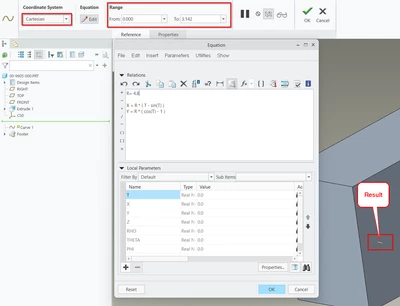
I’m trying to insert a brachistochrone curve into a 3D model in Creo Parametric 10 on the XY-plane using the “Curve from Equation” feature. Unfortunately, I can’t seem to get it to work… The only result I get is a short straight line segment.

The formula for the brachistochrone curve should be:
R = 4.8 (own shoosen radius)

X = R * ( T - sin(T) )
Y = R * ( cos(T) - 1 )

Tmax = 3.142 (= Pi)

Can someone help me with this?

This is what my result is:
GD_10528138_0-1765271481918.png


Best answer by Voronov

Hi! Try this

Tmax = 1


X = R*(T*pi*2-sin(T*360))

Y = R*(cos(T*360)-1)

2 replies

19-Tanzanite
December 9, 2025

in Creo, the trigonometric functions use degrees, not radians.

6-Contributor
December 9, 2025

Thanks for your quick reply Pausob!
OK, that's good to know, but what should the equation be then?

19-Tanzanite
December 11, 2025

you can leave the equation as is, just increase the range from 0 to 360.

pausob_0-1765411863639.png


Voronov12-AmethystAnswer
12-Amethyst
December 9, 2025

Hi! Try this

Tmax = 1


X = R*(T*pi*2-sin(T*360))

Y = R*(cos(T*360)-1)

6-Contributor
December 9, 2025

Thanks Vronov, this works!