
3-Newcomer
Oct 12, 2026 10:54 PM UTC
Question

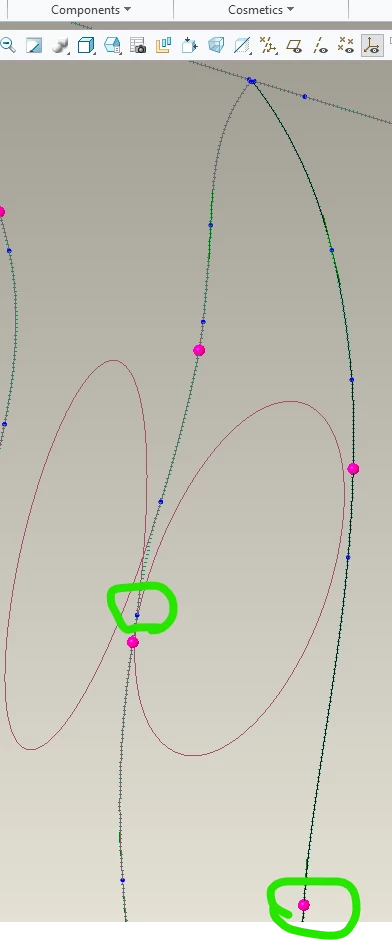
Cable creates loops when removing splices?

Hello,

I am a new user with CREO. When I remove a splice and place it on another branch it creates this loop from the prior splice location? I circled the prior and new location of the splice.

my following steps: 

  1. delete splice
  2. Insert component and place splice on next branch

Am I missing a step or doing something wrong? there is two wires going to the splice, but I did not delete those.


Thank you!
 

    2 replies

    Community Moderator
    Oct 19, 2026 7:24 PM UTC

    Hi ​@LM_14714277,

    Thank you for your question.  
     
    Your post has not yet received any response. I am replying to raise awareness. Hopefully, another community member will be able to help. 
     
    Also, feel free to add any additional information you think might be relevant. 

    Thanks,

    Anurag 

    Translate
    14-Alexandrite
    Oct 27, 2026 12:39 PM UTC

    Hello,

    When you manually add a splice to a wire Creo splits that wire to two segments.
    The problem with that is that creo doesn't create the other wire for you in that case. It is still W-1 with the same total length. A real butt splice (end to end connection) is that you will have 2 wires, W-1 and W-2 (or more wires) that are joined with the splice.

    Creo help actually warns about this 


    "If the splices are manually inserted and not added logically, the wires may appear incomplete in the Model Tree. HMX will not process the incomplete wires. Change the electrical connector parameters from type SPLICE to type CONNECTOR and regenerate, wires will now appear complete."


    You can manually delete the other segment and route a separate wire to your splice thus making the cable complete. Usually I prefer to use a schematic to create the splice so that it is logically complete.

    Splice in schematic

    As to why creo creates those loops...

    • when you remove the splice you still have your wire split in the location. Perhaps the bend radius for the spool (wire) is too big? You can try to move the location points a little to see if the loops disappear.
    • I would delete the split wire (both Cable/Bundle Segments) and route it again using the network.
    • If your purpose is just to show the splice location, then add the splice as in-line connector to the location so that the wire is not cut. If the wire is not cut then maybe removing the splice won't do any loops...

    Br, Lars

    Translate