Yogesh.T
14-Alexandrite
January 15, 2025
Solved

Cabling Vs Advance Sweep

  • January 15, 2025
  • 1 reply
  • 1316 views

I think Advance sweep features are powerful and well controlled compared to cabling. Having said that, why was Cabling application created. All features could have been added to sweep feature menu. Mainly I think it is just the flattening of harness. why to make it so complex instead keeping it simple with advance sweep and curves?    
Best answer by Lars_F

Here is my 2 cents...


For us the most important parts of the Cabling application are
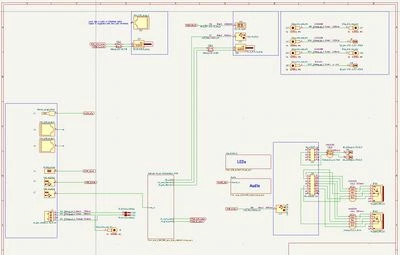
a) The schematic input. Meaning the logical connection and cable + connector selection (file that is read into the Cabling module).

Lars_F_0-1737039573524.jpeg


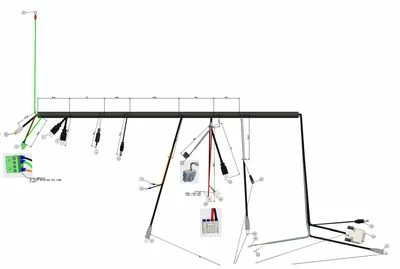
b) The flat diagram output + BOM for the manufacturer to make the harness for us. The flat diagram below is actually created from the schematic above (the top level schematic only shown).

Lars_F_1-1737039604686.jpeg


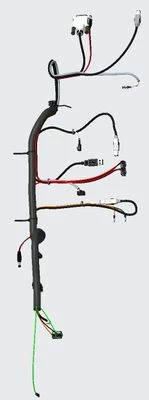
So the intermediate part (routing)

Lars_F_2-1737039637858.jpeg


is just to check that everything fits and to get the lengths for the cables and wires. It could be done by sweeps, curves, lines or what ever but the current way of creating route networks seems to work well for us also. But I believe the Cabling module is currently the only way in Creo to get us from a to b... 


Br,

Lars

1 reply

Lars_F14-AlexandriteAnswer
14-Alexandrite
January 16, 2025

Here is my 2 cents...


For us the most important parts of the Cabling application are
a) The schematic input. Meaning the logical connection and cable + connector selection (file that is read into the Cabling module).

Lars_F_0-1737039573524.jpeg


b) The flat diagram output + BOM for the manufacturer to make the harness for us. The flat diagram below is actually created from the schematic above (the top level schematic only shown).

Lars_F_1-1737039604686.jpeg


So the intermediate part (routing)

Lars_F_2-1737039637858.jpeg


is just to check that everything fits and to get the lengths for the cables and wires. It could be done by sweeps, curves, lines or what ever but the current way of creating route networks seems to work well for us also. But I believe the Cabling module is currently the only way in Creo to get us from a to b... 


Br,

Lars

Yogesh.T
Yogesh.T14-AlexandriteAuthor
14-Alexandrite
January 17, 2025

Hi Lars,

Great analysis and reply . Some points to make: 

So Creo can generate schematic from 3D cabling? I didn't know that.

Also I am not happy with the way it flattened the cable, but may be that is the right way what it is and technically correct.

Looking at your reply it seems that it is worth lot more that 2 cents :). THANKS for your thoughts. 

Is there a tutorial that I can use to slowly come to your level of expertise?  That will be good . Appreciate.


Yogesh
Catalina
Community Moderator
January 23, 2025

Hi @Yogesh.T ,

I wanted to see if you got the help you needed.

If so, please mark the appropriate reply as the Accepted Solution or please feel free to detail in a reply what has helped you and mark it as the Accepted Solution. It will help other members who may have the same question.
Please note that industry experts also review the replies and may eventually accept one of them as solution on your behalf.

Of course, if you have more to share on your issue, please pursue the conversation.

Thanks,

Catalina | PTC Community Moderator