10-Marble
February 19, 2024
Solved

Call custom assembly parameter into BOM

  • February 19, 2024
  • 2 replies
  • 6797 views

Dear Team,

I have created a custom parameter into the assembly, Now I want to call this parameter into BOM table. I know how to use repeat region, but I am not able to call the assembly custom parameter into drawing BOM table. Please help. 

Best answer by MartinHanak

@MS_9892725 wrote:

It indicates no. of qty to be manufactured for this assembly.


Hi,

if I understand you well then Total_Qty parameter value is related to the component in context of the assembly.

If your Creo version is 7.0 or higher then:

  • download my test data set repeat_region.zip (2024-02-19 06:24 PM)
  • unzip it
  • open t_asm.asm
  • open Parameters dialog box ... see following picture
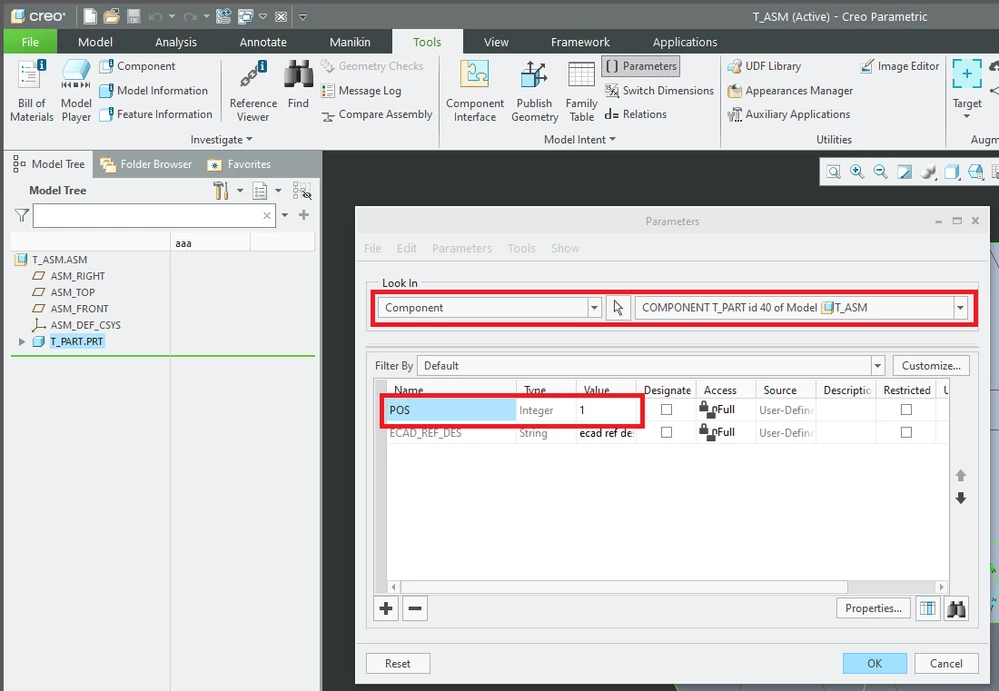
MartinHanak_0-1708674985910.png

  • you can define Total_Qty parameter just as the POS parameter is defined
  • close Parameters dialog box
  • open t_asm.drw
  • edit contents of 3rd cell ... see following picture
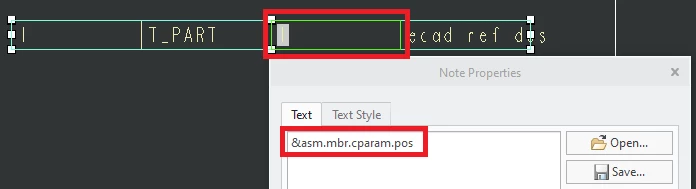
MartinHanak_1-1708675203732.png

  • you can enter &asm.mbr.cparam.Total_Qty to display value of Total_Qty parameter

 

2 replies

24-Ruby III
February 19, 2024

Hi,

according to https://support.ptc.com/help/creo/creo_pma/r10.0/usascii/index.html#page/detail/System_Parameters_for_Drawings.html


&asm.mbr.MODELPAR displays parameter defined on part/subassembly level

&asm.mbr.cparam.COMPPAR displays parameter defined on assembly component level


10-Marble
February 19, 2024

Hi Martin,

Thanks for info, I had checked that, but it is not working.

24-Ruby III
February 19, 2024

@MS_9892725 wrote:

Hi Martin,

Thanks for info, I had checked that, but it is not working.


Hi,

such brief communication does not enable me to help you. please provide more information, picture, Creo data

17-Peridot
February 19, 2024

MS,


We use &asm.mbr.title in our on drawing BOM.