
14-Alexandrite
August 15, 2022
Solved

Can I adjust the size of the window for redefining features?

  • August 15, 2022
  • 6 replies
  • 2081 views

When I edit features and the references for parts in my assembly are gone, I need to redefine the constraints using this window.
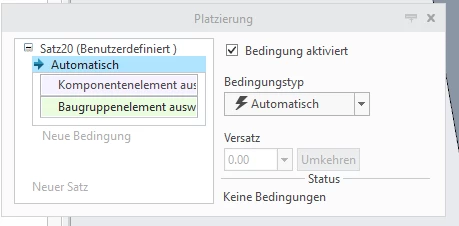
This is what the window looks likeThis is what the window looks like

But the names of the features are way longer than the window, so they mostly do not fit inside. Is there maybe any way to extend the window where the name of the features is written into?
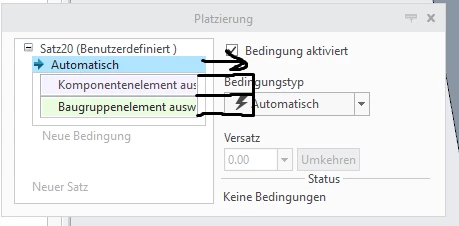

can_you_make_this_window_bigger2.png


Best answer by StephenW

I usually move my mouse over the reference and look at the message log to determine the feature name. Its a horrible work-around but the only one I have


StephenW_0-1660562613302.png


6 replies

24-Ruby III
August 15, 2022

@AB_10071442 wrote:

When I edit features and the references for parts in my assembly are gone, I need to redefine the constraints using this window.

This is what the window looks likeThis is what the window looks like

But the names of the features are way longer than the window, so they mostly do not fit inside. Is there maybe any way to extend the window where the name of the features is written into?
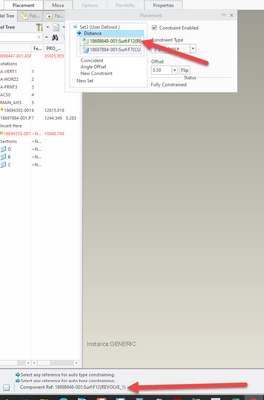
can_you_make_this_window_bigger2.png


Hi,

unfortunately requested functionality is not implemented.

kdirth
21-Topaz I
August 15, 2022

Here is an Idea to allow this functionality:


Ribbon tool drop-down dialog resize option 

There is always more to learn.
StephenW
StephenW23-Emerald IIIAnswer
23-Emerald III
August 15, 2022

I usually move my mouse over the reference and look at the message log to determine the feature name. Its a horrible work-around but the only one I have


StephenW_0-1660562613302.png


mkajdan
14-Alexandrite
August 15, 2022

In Creo 8, if you hover over the constraint it will automatically expand so you can read the full name of the feature so it appears this has been addressed.


mkajdan_0-1660566701590.png


14-Alexandrite
August 18, 2022

While your mouse is hovored above the window, you can actually scroll using your mouse wheel, so that the name of the feature moves left and right within the window. That way, you can read the name of the feature. (I'm using Creo 4.0)

21-Topaz I
August 22, 2022

When redefinine a constraints when the name of the entity is too look, the display box is too short and you need to hover with the mouse to get the complete name. This is indeed annoying and this is working to product specifications for Creo Parametric.
To request solution to maybe make the display box sizeable and/or auto sizeable, you might want to file a Product Idea.

kdirth
21-Topaz I
August 22, 2022
There is always more to learn.