
1-Visitor
February 26, 2023
Solved

can i change the existing drawing view in creo

  • February 26, 2023
  • 3 replies
  • 2723 views

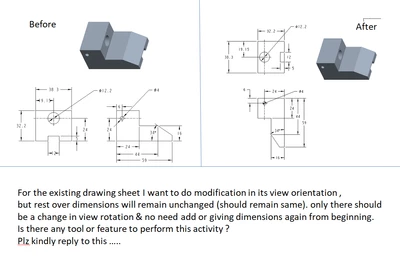
for an existing drawing view, i want to change its rotation of that view .
 

GR_10518809_1-1677437514259.png


For the existing drawing sheet I want to do modification in its view orientation ,

but rest over dimensions will remain unchanged (should remain same). only there should

be a change in view rotation & no need add or giving dimensions again from beginning.

Is there any tool or feature to perform this activity ?

(actually i am making a assembly drawing of a model)


Plz kindly reply to this …..



Best answer by tbraxton

Video demonstration of how to do this with shown dimensions. Redefine the view name of the view on the print that serves as the projection reference for the orthographic projection.


In order for this to work with shown dimensions your new reference view must be parallel to the initial view used when showing the dimensions. In this example I am swapping the back view for the front view.


3 replies

22-Sapphire II
February 26, 2023

The answer is maybe, it will depend on how your dimensions were created in the drawing view. If you are using shown dimensions or annotations from the 3D model this is possible. If you created the dimensions in drawing mode, then it is not likely going to be possible. 


Have you attempted to do this with your model? Save a copy of the models to a test directory and modify the view names in the model to change what is shown on the drawing.

tbraxton22-Sapphire IIAnswer
22-Sapphire II
February 27, 2023

Video demonstration of how to do this with shown dimensions. Redefine the view name of the view on the print that serves as the projection reference for the orthographic projection.


In order for this to work with shown dimensions your new reference view must be parallel to the initial view used when showing the dimensions. In this example I am swapping the back view for the front view.


21-Topaz I
April 4, 2023

I agree with @tbraxton that the best answer is maybe. 


To moving the left view to the top view and reorient the front. you would need to:

  1. make both views general views and move the left above the front
  2. reorient the front view
  3. change the top view to a projection view
  4. clean up the dimensions

* This will most likely not work well, especially with driven dimensions.


If I were to need to do this, I would create the wanted views on the side then move the dimensions to the new views.  Some of the driven dimensions (made in the drawing) are likely to not move well and will need to be recreated.  Also, the dimensions would need to be cleaned up, as the placement and extension lines will not be correct.