

can't get tangency at seam of opposing cylinder extrudes
I have a fairly simple parting faces quilt that I need to finish out but I can't get the boundary seam of the opposing cylinders to become tangent. After completing the parting faces quilt I need to use the thicken option to uniformly thicken these faces to build a gutter model; as is I can only thicken the quilt to about .125 where it will need to be .500 in thickness.
Shown below is the area I am struggling with. The highlighted edges show the area that I am working on. I have penciled the non-tangent seams in red.
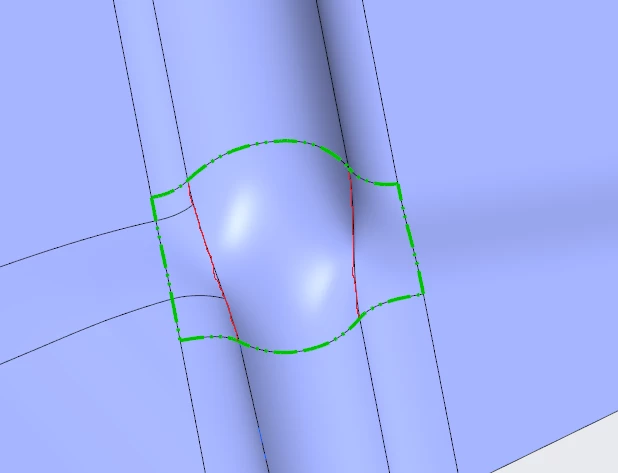
I have attempted different options from Boundary Blend to the Style function. I have attempted this with and without curve rails in the red highlighted areas. I know that there naturally is an area of twist due to the conflicting up facing and down facing cylinder extrudes. Might there be some kind of option that would iron out the natural seams to allow tangency throughout?
(I also tried this as a simple 4 sided boundary blend but the tangency toggle failed on the left side which has 3 edges)