
3-Newcomer
June 25, 2026
Question

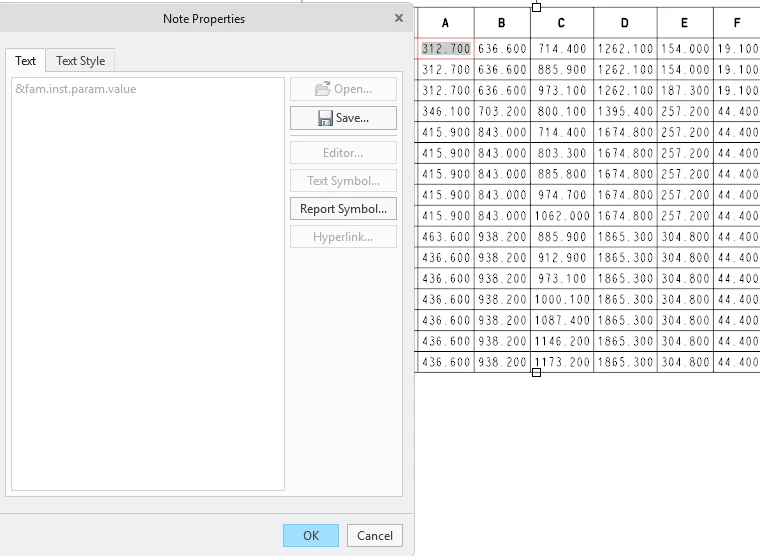
Can´t modify Note Properties

  • June 25, 2026
  • 5 replies
  • 84 views

I am working with Family tables and repeat regions, i know that adding the [.1] i can changes my family tables decimals but it seems like i can´t access to that panel to update them.

Are there any solution for this??? or am i missing something???
 

5 replies

Radwan Almsora
5-Regular Member
June 26, 2026

To modify the decimal places in a Creo Parametric family table repeat region, you must switch symbols first.


When the table is actively displaying the populated numbers (such as 312.700), the cells are temporarily locked from direct property text overrides, which is why your text panel text box is greyed out.

Radwan Almsora
kdirth
21-Topaz I
June 26, 2026

Took a little trial and error and testing.  Being a family table table, it is a 2-D repeat region, and it works a bit different.  Switch Symbols and edit the cell in the second row with fam.inst.param...

There is always more to learn.
3-Newcomer
June 26, 2026

Thanks for the point, i modify the Note Properties but it seems that my table do not update. 


kdirth
21-Topaz I
June 26, 2026

You may need to regenerate and/or Update Tables from Table > Data in the ribbon.


There is always more to learn.
11-Garnet
June 26, 2026

I thought you could only update decimal places by changing the actual dimension itself to whatever your choice of decimals.  You can't choose for the column to be a mix of decimal places