1-Visitor
August 5, 2022
Solved

Can't revolve sketch

  • August 5, 2022
  • 3 replies
  • 4772 views

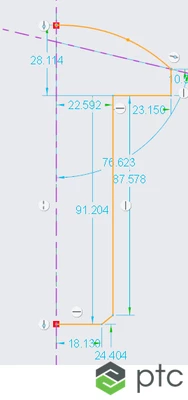
I'm having trouble revolving this sketch. I've redrawn this from scratch a few times, but I still can't revolve this. Is there something wrong with this sketch that makes it unable to be revolved?


? Screenshot 2022-08-04 204504.jpg
Best answer by remy

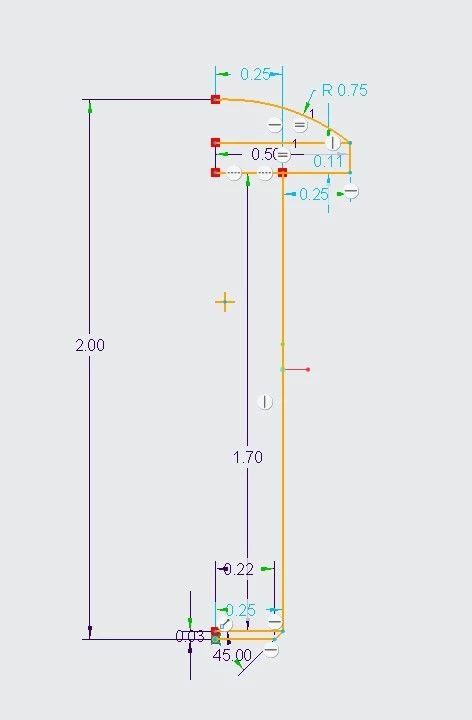
You need assistance in creating a revolve feature and you are currently stuck with the sketcher. Like @tbraxton said the Feature Requirements tool will guide you.


More specifically here are what's wrong on the sketch right now:

  1. The sketch is missing the axis/centerline around which it will revolve
  2. The lines create overlapping geometry

Here is what it should look like approximately:

remy_0-1659693073000.png


3 replies

tbraxton
22-Sapphire II
22-Sapphire II
August 5, 2022

Creo intent manager will offer help for this, see the picture below showing how to get hints from the intent manager in sketch mode. It appears that your sketch has more than one open loop which is one issue. Watch the command line (usually at the bottom of the graphics window ) for warning messages as well.


tbraxton_0-1659668787811.png


24-Ruby III
August 5, 2022

Hi,

imagine a section of the model and sketch half of it.

remy21-Topaz IAnswer
21-Topaz I
August 5, 2022

You need assistance in creating a revolve feature and you are currently stuck with the sketcher. Like @tbraxton said the Feature Requirements tool will guide you.


More specifically here are what's wrong on the sketch right now:

  1. The sketch is missing the axis/centerline around which it will revolve
  2. The lines create overlapping geometry

Here is what it should look like approximately:

remy_0-1659693073000.png


verity1-VisitorAuthor
1-Visitor
August 5, 2022

Thanks! I didn't know about the Feature Requirements tool, so that will definitely be helpful. I was getting the sense that maybe there were too many extra lines in my drawing, now I know.

21-Topaz I
August 8, 2022

two takeaways with the revolve feature:

  1. Remember the rotating centerline. The best practice: create it first / as soon as the sketcher is loaded.
  2. Think about the sketch in terms of envelope and when sketching imagine the outer "shell" of your solid after the sketch is "Oked"