8-Gravel
September 27, 2023
Solved

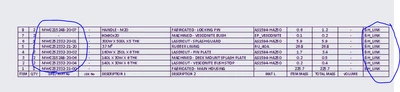
Can we add a hyperlink for a part in BOM table?

  • September 27, 2023
  • 1 reply
  • 1016 views

AT_CADDM_0-1695789140854.png


Best answer by Mohan_13

Hi @AT_CADDM ,

You can add individual hyper links to text displayed in the repeat region table only if the cell is defined as a ‘Comments’ cell. Otherwise, adding the hyper link to the first cell contents would repeat it to all the cells in that column.


A commented cell allows the user to type in required custom text and does not repeat the same for other cells of the column. So, you could type in required text (remarks) for each cell separately. Also, the commented cell is attached to the row. So, if the row position changes, the commented cell will automatically move along with it.

To define a comment cell in existing repeat region, follow the procedure given below.


  1. Add a new column to the repeat region table using #Table# Repeat region > Comments > Define Cell and
  2. Select the first cell of the new column in the region. Comment cell defined will be returned in the message area.
  3. Once the comment cell is defined, you can select any cell from this new column, use right click pop-up menu option properties and define the custom text and Hyper link.

Regards,

Mac

1 reply

Mohan_1314-AlexandriteAnswer
14-Alexandrite
September 28, 2023

Hi @AT_CADDM ,

You can add individual hyper links to text displayed in the repeat region table only if the cell is defined as a ‘Comments’ cell. Otherwise, adding the hyper link to the first cell contents would repeat it to all the cells in that column.


A commented cell allows the user to type in required custom text and does not repeat the same for other cells of the column. So, you could type in required text (remarks) for each cell separately. Also, the commented cell is attached to the row. So, if the row position changes, the commented cell will automatically move along with it.

To define a comment cell in existing repeat region, follow the procedure given below.


  1. Add a new column to the repeat region table using #Table# Repeat region > Comments > Define Cell and
  2. Select the first cell of the new column in the region. Comment cell defined will be returned in the message area.
  3. Once the comment cell is defined, you can select any cell from this new column, use right click pop-up menu option properties and define the custom text and Hyper link.

Regards,

Mac