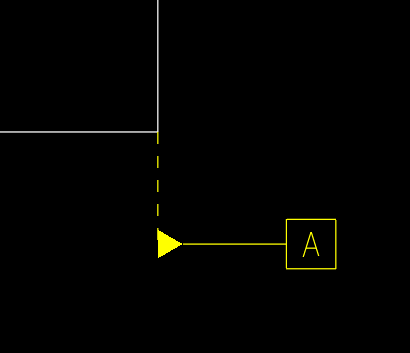
I think this is the same picture that was in the hide datum planes discussion that Antonius had the video showing how to make those a different way - annotations.
It is. Antonius showed me how to make those annotations - which I did, but mine came out with a dashed line instead of solid and I'm trying to figure out how to change it. Antonius didn't know - so I started a new discussion.
I think we need to start from beginning: Main question is - why do you need to change line style standard for Standard (ANSI, DIN, ISO etc.) GTOL and Reference plane? Do you use different Standard? Why do you need to customize this?
No, I am sorry - I am saying ... Why do "you" (ulaengin) want to change the standard (for GTOL and reference plane) - it is necessary for your engineering design?
I too have the same problem. It seems that if we add the datum symbol from Show model annotations, we get this dotted line, whereas if we add it manually in the drawing, we get a solid line. Does anybody have any solution to this?
Yes you can change the leader line extension. In the drawing go to File, Prepare, Drawing properties. In the configuration file look for "leader_extension_font". Set the option in the value window by typing "solidfont". Hit apply
Good Luck
Translate
Windchill Satisfaction Survey
Help shape the future of Windchill. Take our 5-minute survey and share your feedback.