14-Alexandrite
October 6, 2023
Solved

Can you open an old version of an assembly in Windchill with the corresponding part versions?

  • October 6, 2023
  • 1 reply
  • 1609 views

When I open an old version of an assembly using Windchill, it opens with the newest version of the components. Is there a way of opening the old version of the assembly with the then-versions of the components assembled?

 

Best answer by StephenW

Yes. You will want to do this in a new, empty workspace.

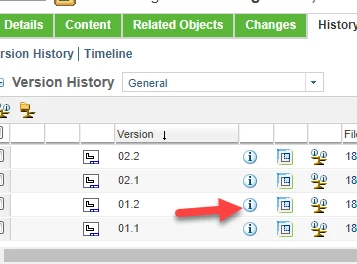
On the assembly, you will go to the history tab and click the info button for the older assembly version you wish to open.

Then click ACTIONS, ADD TO WORKSPACE.

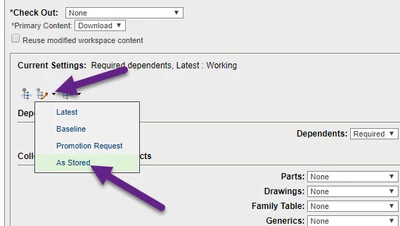
Then the "edit filter" drop down "as stored"

The verify that the dialog box that pops up shows  "as stored" then OK button, and OK button the add to workspace window


StephenW_0-1696588613760.png

StephenW_1-1696588812799.png


1 reply

StephenW
StephenW23-Emerald IIIAnswer
23-Emerald III
October 6, 2023

Yes. You will want to do this in a new, empty workspace.

On the assembly, you will go to the history tab and click the info button for the older assembly version you wish to open.

Then click ACTIONS, ADD TO WORKSPACE.

Then the "edit filter" drop down "as stored"

The verify that the dialog box that pops up shows  "as stored" then OK button, and OK button the add to workspace window


StephenW_0-1696588613760.png

StephenW_1-1696588812799.png