
Solved

To close this community thread on the ability to show Centre of Gravity (CG) for parts, assemblies and drawings as icon.
Summary of the proposed solutions:
Create a Datum Point or Coordinate System to represent the Center of Gravity in the 3D model:
- If you have the Behavioral Modeler (BMX) option or extension in your license:
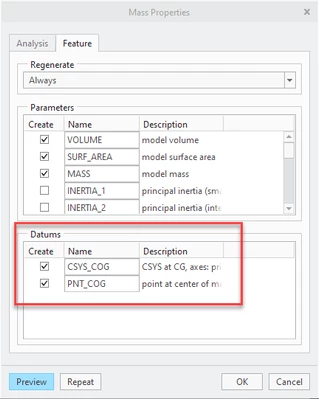
- You can create an Analysis > Mass Properties feature and directly generate Datum Point and / or CSYS
See how to verify the modules included in your Creo license in article CS165589, and review Creo Design packages in CS298294
- If you do NOT have the BMX option:
- You can compute the Mass Properties from File > Prepare > Model Properties > Mass Properties > change to Generate Report, if they are not calculated automatically
- This should populate the PRO_MP_COGX, PRO_MP_COGY and PRO_MP_COGZ model parameters
- Create your own Datum Point or CSYS and constrain their dimensions with relations and the above parameters
- Refer article CS40552 for steps and details, and this PDF file posted in the thread
Use the created 3D Datum Point or CSYS to place the icon / symbol:
- Once the 3D reference is created you can use it to position your custom symbol (we can also imagine inserting a Sketch in 3D directly) or placing existing icon from the Palette, as suggested in article CS325823
Enter your E-mail address. We'll send you an e-mail with instructions to reset your password.