13-Aquamarine
November 10, 2022
Solved

Change distance between Dim and curved line?

  • November 10, 2022
  • 1 reply
  • 1280 views

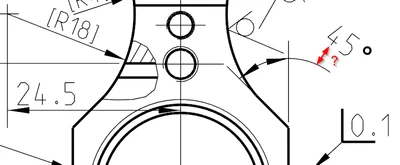
See this image:


2022-11-09 15_43_00-WM60_9203030100 (Active) - Creo Parametric.png

The distance between 45° and the curved line is huge compared to the distance between 24.5 and its straight line, making it look a bit weird and inconsistent. I have searched in the config.pro but there doesn't seem to be any setting for this. Any ideas?

Best answer by kdirth

Try setting dimension Display to Parallel Fully Outside.

1 reply

kdirth
kdirth21-Topaz IAnswer
21-Topaz I
November 10, 2022

Try setting dimension Display to Parallel Fully Outside.

There is always more to learn.
13-Aquamarine
November 10, 2022

That's indeed an improvement! Thanks!


Thought though: - Why is it called "Parallel Fully Outside"?? Seems like a terrible confusing description considering what it actually does. 🤔😄