
1-Visitor
June 2, 2021
Question

Change the material name in the parameters box

  • June 2, 2021
  • 2 replies
  • 2654 views

I am running into a bit of an issue.  I want to change the name of the material to "purch" for my purchased components but keep the material properties.  Essentially what I want to accomplish is in my assembly drawing BOM it will be clear which items are purchased and which are manufactured.  


When I go to PTC_Material_Name and try to change it, I get an error saying "invalid value
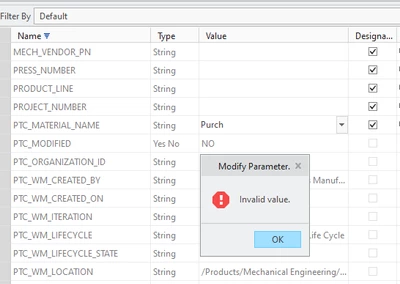
 

NR_9770144_0-1622647885938.png


2 replies

23-Emerald III
June 2, 2021

What does the column to the right say (Access column)?

That parameter may be Locked by Windchill or relation driven.

1-Visitor
June 2, 2021

its set to full access

17-Peridot
June 2, 2021

PTC_MATERIAL_NAME is a special Creo parameter. Changing the value of PTC_MATERIAL_NAME changes the assigned material of the part. You can only swap between materials that are added to the model. You could make a material called 'PURCH' copied from the desired material, add it to the model, and then Creo should let you pick your 'PURCH' material.


Another idea could be creating another parameter or two to keep track of PURCHASED = YES/NO or MAKE_BUY = MAKE/BUY... Then you could better keep track of this independent of the assigned material. You could then use relations to toggle a parameter like MAKE_MATERIAL. If PURCHASED = YES, then MAKE_MATERIAL = "PURCH" ELSE MAKE_MATERIAL = PTC_MATERIAL_NAME. This relation could either be in the part or the the drawing repeat region BOM.

1-Visitor
June 2, 2021

Well that's disappointing