
12-Amethyst
December 7, 2023
Solved

Change View Label Details

  • December 7, 2023
  • 1 reply
  • 3409 views

Hello,


This is a difficulty I have had with Creo for a long time, I always resort to adding a manual note to look as I want but I was wondering whether what I am trying is actually possible.


I have a detail view but wish to have different layer settings for that particular view (compared to its parent) so changed the detail view type to 'General'. By making this a general view, the view label now defaults to the section view (&xsec_name). The detail view retains its name (C) but when I change the view label to say (&view_name), it just returns to the default &xsec_name.
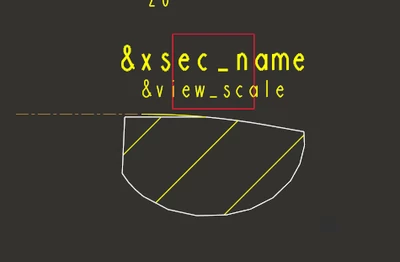
nhall_0-1701943055211.png


Simple question is; is it possible to create manual notes that are associated with specific views that will pull the relevant information from the view by adding the relevant &_x_ information?


N.B. I am running Creo Parametric version 8.0.7.0

Best answer by pausob

I am pretty sure the answer is "no".  Frustrating, but the notes in the Creo drawing package are often "dumb, static things" (definitely "non-parametric")

In this particular case, it is baffling as how the name of a view (parameter VIEW_NAME) is there and the system can use it and generate a draft note with it - but a user cannot.

1 reply

pausob19-TanzaniteAnswer
19-Tanzanite
December 7, 2023

I am pretty sure the answer is "no".  Frustrating, but the notes in the Creo drawing package are often "dumb, static things" (definitely "non-parametric")

In this particular case, it is baffling as how the name of a view (parameter VIEW_NAME) is there and the system can use it and generate a draft note with it - but a user cannot.

nhall12-AmethystAuthor
12-Amethyst
December 8, 2023

A little ironic for 'Creo Parametric' really haha but thanks for your response, glad to know i haven't been missing something obvious all these years.