
10-Marble
March 25, 2025
Solved

Changing a cable route's End To location

  • March 25, 2025
  • 3 replies
  • 1595 views

I am using Creo 10 to create cable routing. I have a cable I'd like to edit its "To" location, but I cannot figure out how to delete or edit the current one. Everything else, locations and "From" locations are fine and there is no need for edit. Is there a way to do this before I delete and rerun? 
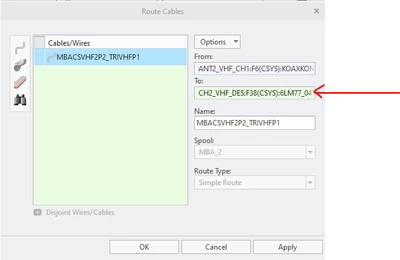
 

Charles421SD_0-1742909255321.png


Best answer by AH_10565398

That's super weird.  They were to/from designated connectors?


3 replies

Catalina
Community Moderator
March 31, 2025

Hi @Charles421SD 

Thank you for your question. 

Your post appears well documented but has not yet received any response. I am replying to raise awareness. Hopefully, another community member will be able to help.

Also, feel free to add any additional information you think might be relevant.


Best regards,

Catalina | PTC Community Moderator
14-Alexandrite
March 31, 2025

Use REROUTE. Right click on cable (reroute). See image. Hope it helps. 

12-Amethyst
April 4, 2025

Go into the parameters of the wire (right click in the model tree and click on parameters) and then click flip cable ends.

AH_10565398_0-1743787881281.png


EDIT: I misread your post.  You can do the following.
1) Select the end you want to change.
2) Select a different connector.

3) Pick and entry port.
4) Okay.

AH_10565398_0-1743788330897.png


10-Marble
April 9, 2025

Thank you. Your solution was what I was shooting for, but my "From" and "To" fields are grayed out and inactive. I have since rerouted the cables as they were not too labor intensive, but I'd like to understand more efficient options in the future. Can you share your thoughts on why my two fields would not be active? 


Thank you. 

12-Amethyst
April 9, 2025

That's super weird.  They were to/from designated connectors?