
13-Aquamarine
May 12, 2023
Solved

Changing parameters in drawings

  • May 12, 2023
  • 4 replies
  • 2319 views

Hi,

As you can see in the example below, I'm changing the scale of a view : 
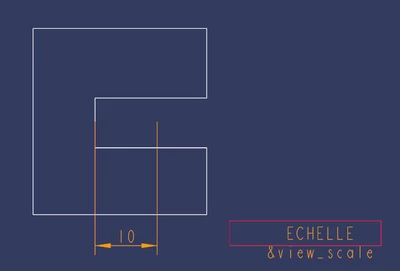
LearningProcess_1-1683892281695.png

After clicking on the scale, this pop up appears : 
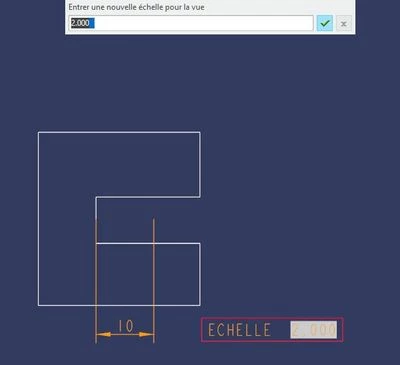
LearningProcess_0-1683892249331.jpeg

My problem is that every time I use CTRL+A (normally to select all) when it is activated, this blue rectangle appears and changes what I type next.


This problem isn't only with the parameter &view_scale but any other parameters (&Material / &Scale ...).


How can I modify this short cut ?


Thanks.



Best answer by StephenW

I don't think you can change it. When in a prompt like that, for whatever reason, CTRL+A switches to the text palette. CTRL+B will switch it off. I don't know who uses those commands like that.


CTRL+A in Creo is generally used to activate the current window but within some of the dialog boxes, it works like windows as a select all.


Maybe someone else has a solution for you, hopefully. 

4 replies

StephenW
StephenW23-Emerald IIIAnswer
23-Emerald III
May 12, 2023

I don't think you can change it. When in a prompt like that, for whatever reason, CTRL+A switches to the text palette. CTRL+B will switch it off. I don't know who uses those commands like that.


CTRL+A in Creo is generally used to activate the current window but within some of the dialog boxes, it works like windows as a select all.


Maybe someone else has a solution for you, hopefully. 

SR_CAD13-AquamarineAuthor
13-Aquamarine
May 12, 2023

Thanks, both of you.


Using CTRL+B to switch it off will at least give me a great way to solve this rather than closing the entire soft.


24-Ruby III
May 12, 2023

Hi,

please play uploaded video.


EDIT: I misunderstood the description of the problem. My video does not make sense.