
3-Newcomer
June 27, 2024
Solved

Combining multiple surface area measurements into one parametric value for a drawing note.

  • June 27, 2024
  • 1 reply
  • 1116 views

Working in Creo 10 I have a note on a drawing that I need to call out a combined surface area for two separate areas on the part. With single surface areas I like to drive the note parametrically by creating a measure feature in the model and referencing it in the drawing note with "&AREA:FID_XXXXXX[.1].
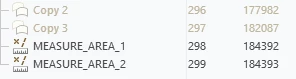
CC_9314822_0-1719498309000.png

Which ends up with this, which is what I want.
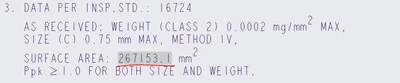
CC_9314822_1-1719498450966.png

However, to have both surface areas in one note I have to add them manually and input them as text, non-parametric. I've been trying various takes on this: "&area:fid_xxxxx1+xxxxx2" with no luck.


Does anyone know how to combine both values into one parametric note?



Best answer by KenFarley

You could create a parameter that will be your combined area, like "areaTotal".

Then use a relation to calculate the sum of all the areas you want.


areaTotal = AREA:FID_XXXXX1 + AREA:FID_XXXXX2


Alternatively, when you define the area measurement, pick the multiple surfaces of interest, using the <Ctrl> key. The resultant area measurement will be a total of all the surfaces selected.

1 reply

KenFarley
KenFarley21-Topaz IIAnswer
21-Topaz II
June 27, 2024

You could create a parameter that will be your combined area, like "areaTotal".

Then use a relation to calculate the sum of all the areas you want.


areaTotal = AREA:FID_XXXXX1 + AREA:FID_XXXXX2


Alternatively, when you define the area measurement, pick the multiple surfaces of interest, using the <Ctrl> key. The resultant area measurement will be a total of all the surfaces selected.

3-Newcomer
June 28, 2024

I'm slightly embarrassed to say I hadn't considered creating a parameter in the model, I was so focused on doing it in the drawing but it accomplishes what I want. Thanks Ken.