

kdirth
21-Topaz I
21-Topaz I
December 2, 2021
Solved

Config setting drawing_name_sameas_model_name not working

  • December 2, 2021
  • 1 reply
  • 2057 views

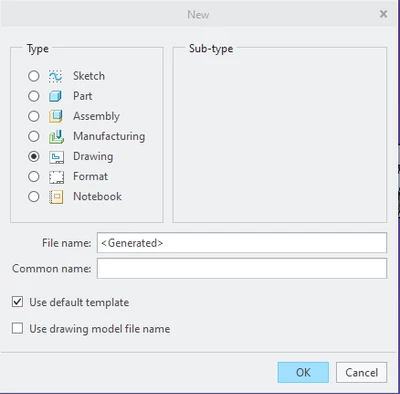
Has anyone tried the config setting drawing_name_sameas_model_name?  The documentation I found for it says "yes" will auto select the check box for Use drawing model file name.


I found it today and set it to yes.  When I tried making a new drawing for a part, the checkbox on the New window was not checked for me.  Using 7.7.5.0
kdirth_0-1638479869229.png


Best answer by kdirth

I removed the PTC folder, no Creo subfolder in it as mentioned in CS35023, from C:\Users\Kdirth\AppData\Local and restarted Creo.  It is now working.

1 reply

23-Emerald IV
December 2, 2021

Yes, it's working for me in 7.0.5.0 and later.


See if this article helps:  https://www.ptc.com/en/support/article/CS350233

kdirth
21-Topaz I
kdirth21-Topaz IAuthor
21-Topaz I
December 6, 2021

I closed Creo and deleted the Creo folder at C:\Users\Kdirth\AppData\Roaming\PTC, as suggested in the article, then restarted Creo.  The box remains unchecked when I create a drawing for a new part.

There is always more to learn.
kdirth
21-Topaz I
kdirth21-Topaz IAuthorAnswer
21-Topaz I
December 6, 2021

I removed the PTC folder, no Creo subfolder in it as mentioned in CS35023, from C:\Users\Kdirth\AppData\Local and restarted Creo.  It is now working.

There is always more to learn.