12-Amethyst
August 1, 2025
Question

Coordinate based model challenge

  • August 1, 2025
  • 1 reply
  • 796 views

Hello all,

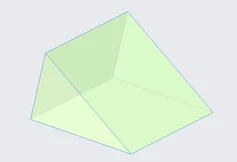
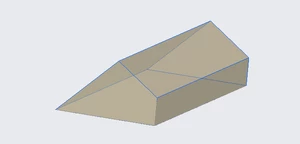
i am having a hard time trying to model a part based off the measurement report that we have gotten and i am wondering what i am doing wrong or how to more accurately model the part. 
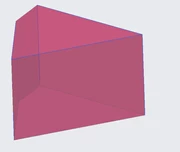
AnthonyC_0-1754039194934.pngAnthonyC_1-1754039211948.pngAnthonyC_2-1754039238492.png


when i try to use a sweep function, i find that one or more corners (depending on if it has 3 or 4 faces) tend to be slightly off. is there a different function i can use to force creo to make a body that fits within the coordinate boundaries? the surfaces should be flat .
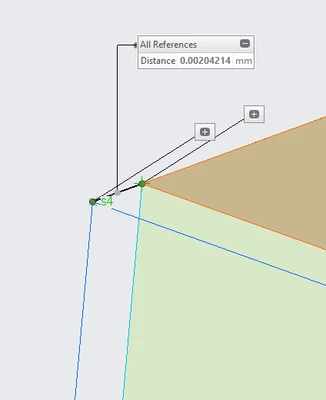
AnthonyC_3-1754041076898.png


CREO Parametric 6.0.6.0


1 reply

24-Ruby III
August 1, 2025

Hi,

I think that coordinates included in Excel file are wrong.


See ITEM1 (for example)

S5-S8 points have Z=0 ... this means they lie in a plane (let's call her PLANE 1)

S5 -3,6244 16,3355 0
S6 8,5455 45,5814 0
S7 58,309 0 0
S8 0 0 0

S1-S4 points do not have the same Z value ... this means they do no lay in a plane parallel with PLANE 1

S1 -3,6151 16,3385 -50,0018
S2 8,5564 45,5903 -50,0067
S3 58,322 0,007 -50,017
S4 0,0088 0,007 -50,0018

Also:

S1-4(X) <> S5-8(X)

S1-4(Y) <> S5-8(Y)

This probably means that points does not belong to planar faces.


kdirth
21-Topaz I
21-Topaz I
August 1, 2025

I agree with @MartinHanak that the points in your spreadsheet do not create planer surfaces.  This may be due to rounding errors in creating the point values.  If I create a datum plane from 3 points on a side, the 4th point is not on that plane except for the surfaces with all Z locations 0.

There is always more to learn.
kdirth
21-Topaz I
21-Topaz I
August 1, 2025

To create the shapes that match all of the points you need to create curves between the points and use boundary blends to create the sides.

There is always more to learn.