1-Visitor
April 30, 2025
Solved

Counterbored Holes using Hole Table.

  • April 30, 2025
  • 2 replies
  • 906 views

I am using Creo Parametric Release 8.0 and Datecode8.0.0.0

I create counterbored holes using the hole feature in my model. When I create my 2D drawing, I create a hole table. The table will give me the through diameter of the hole, but I can't get it to show the counter bore diameter, or the counter bore depth. How do you add the counter bore diameter and depth?

Best answer by mkajdan

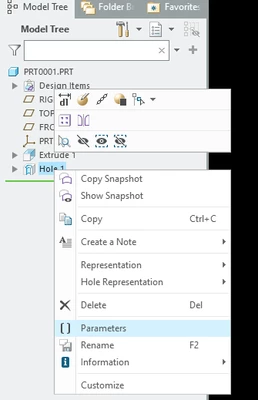
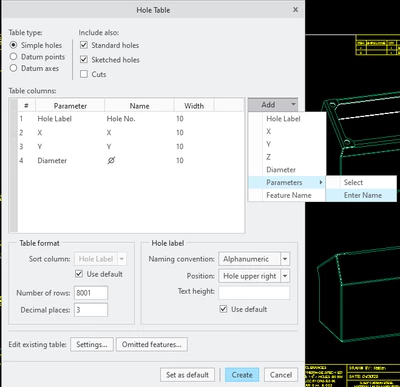
To insert the counter bore depth and diameter, add a new row, Parameters then enter the parameter name.  You can access the feature parameters by right clicking on the feature in the model tree then selecting Parameters.


mkajdan_0-1746042935354.png

mkajdan_1-1746043074091.png


2 replies

Mahesh_Sharma
22-Sapphire I
April 30, 2025

Hi @BT_12786803 


You may try adding hole feature parameters in table using Hole Table > Add > Parameters > Select > Select Feature and add required parameters.


I hope this will help.


Thanks.  

mkajdan
14-Alexandrite
April 30, 2025

Use the parameters for the hole features in custom hole table columns.

mkajdan_0-1746037154966.png


mkajdan_1-1746037191934.png

mkajdan_3-1746037255441.png


1-Visitor
April 30, 2025

Thank you. How are you able to insert the CBORE_DEPTH & CBORE_DIAMETER? Where are you accessing the table in the first picture you shared? 

mkajdan
mkajdan14-AlexandriteAnswer
14-Alexandrite
April 30, 2025

To insert the counter bore depth and diameter, add a new row, Parameters then enter the parameter name.  You can access the feature parameters by right clicking on the feature in the model tree then selecting Parameters.


mkajdan_0-1746042935354.png

mkajdan_1-1746043074091.png