5-Regular Member
October 17, 2025
Solved

Create a datum plane parallel to screen (Creo 11)

  • October 17, 2025
  • 2 replies
  • 429 views

How can i create a datum plane parallel to screen orientation?


Default coordinate system is oriented in the default orientation as i enter in an empty part model. I want to create a datum plane parallel to the screen, while the coordinate is in the default orientation.
Best answer by Van_AG

Well, it can be done, but why?


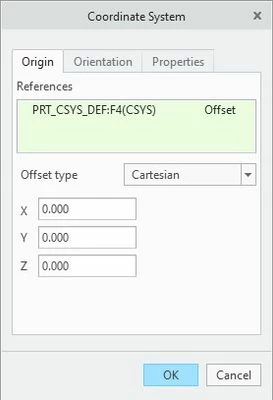
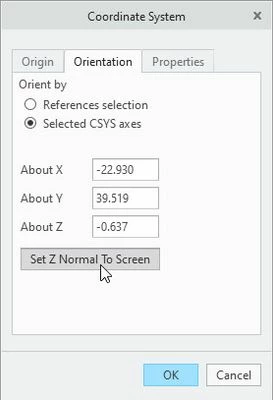
With the default coordinate system (PRT_CSYS_DEF), create a new coordinate system (CS0) with an offset from the default and the z-axis perpendicular to the screen, as shown below.

Snap-2025-10-17-073.jpg   Snap-2025-10-17-074.jpg


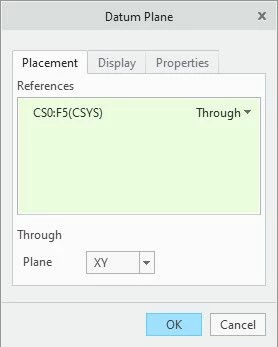
Then create a datum plane with the placement shown below

Snap-2025-10-17-075.jpg


This plane will be flat to the screen at the current orientation of the model.

2 replies

24-Ruby III
October 17, 2025

Hi,

unfortunately your request makes no sense.

Van_AG
Van_AG15-MoonstoneAnswer
15-Moonstone
October 17, 2025

Well, it can be done, but why?


With the default coordinate system (PRT_CSYS_DEF), create a new coordinate system (CS0) with an offset from the default and the z-axis perpendicular to the screen, as shown below.

Snap-2025-10-17-073.jpg   Snap-2025-10-17-074.jpg


Then create a datum plane with the placement shown below

Snap-2025-10-17-075.jpg


This plane will be flat to the screen at the current orientation of the model.

5-Regular Member
October 17, 2025

Thanks! I couldn't find that 'Set Z normal to screen' for new CSYS creation (i tried it using a point and the menu in Orientation tab doesn't have this option)


I needed to make an extrude cut (to a shape) perpendicular to a selected (random) orientation and export a rendered 2D tif/png