1-Visitor
April 22, 2015
Solved

Creating a note that fills in model parameters automatically

  • April 22, 2015
  • 3 replies
  • 8489 views

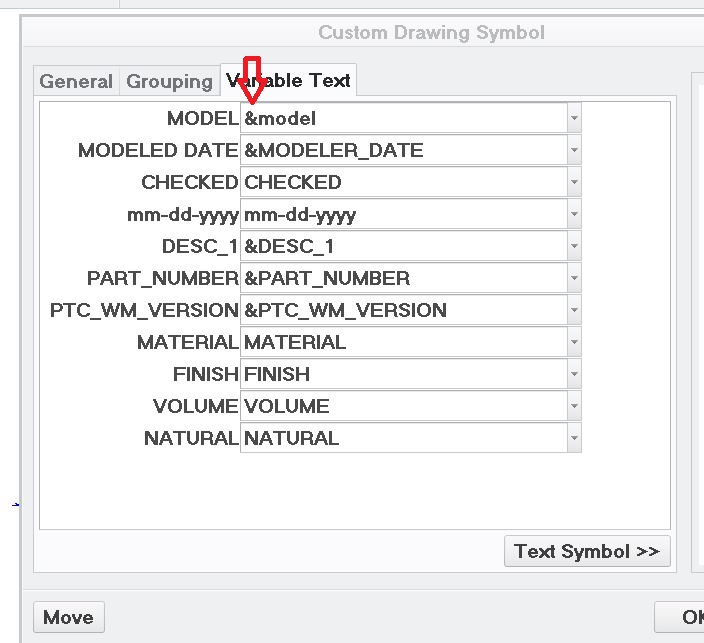
I have a drawing format that I am creating. I have it all set to go but when I add it to a drawing, the only way to get the text to fill in is to add "&" to the text in the pulldown. How do I get the "&" to be included in the symbol so I don't have to add it all the time? Thanks.

parameters.JPG

Best answer by TomU

Jef,

Several recommendations.

1.) Use tables for dynamic information (like parameters read from the model.) They are designed for this and will automatically populate when different formats are applied to the same drawing or a new drawing is created from a template.

2.) Use symbols for static information that will never change. Borders, zones, logos, etc.

3.) Use the built in drawing system parameter &model_name in a table to display the name of the model. (There is no need to create this in the model relations.) Also, this parameter will never point to the drawing, even if no model is present.

4.) To reference parameters from the model, but not have the drawing replace them with "dead text" if they're missing or use the drawing's value instead, create single cell repeat regions that only display that one value. Set the repeat region parameter to &mdl.param.value and the repeat region filter to &mdl.param.name == <PARAMETER_NAME>. Since there will only be one parameter in that one model with that name, the repeat region will never grow. This is a very robust way to reference model parameters.

Finally, here is a link to the most recent System Parameters for Drawings

3 replies

17-Peridot
April 22, 2015

I've tried to get this in the past and couldn't get it to work.

I ended up making fields in the format with the variable instead by adding additional tables in strategic locations.

I hope there is a better answer to this as well.

In theory, a format can be a symbol rather than a table if this were possible.

That would provide significantly more freedom in format creation.

Dale_Rosema
23-Emerald III
23-Emerald III
April 22, 2015

My forms all have a space " " after the &parameter and then when I bring in the form I have to edit each and delete the space and the value fills in.

1-Visitor
April 22, 2015

My thinking is the problem is that you are defining a variable (parameter) as a variable. I would try entering the parameter as static text rather than as variable text.

1-Visitor
April 22, 2015

After first response I noticed that it looks like you are creating a Symbol to act as your Drawing Title Block... For Title Blocks I suggest creating a Table in your Format and using parameters directly in the Table cells.

TomU23-Emerald IVAnswer
23-Emerald IV
April 23, 2015

Jef,

Several recommendations.

1.) Use tables for dynamic information (like parameters read from the model.) They are designed for this and will automatically populate when different formats are applied to the same drawing or a new drawing is created from a template.

2.) Use symbols for static information that will never change. Borders, zones, logos, etc.

3.) Use the built in drawing system parameter &model_name in a table to display the name of the model. (There is no need to create this in the model relations.) Also, this parameter will never point to the drawing, even if no model is present.

4.) To reference parameters from the model, but not have the drawing replace them with "dead text" if they're missing or use the drawing's value instead, create single cell repeat regions that only display that one value. Set the repeat region parameter to &mdl.param.value and the repeat region filter to &mdl.param.name == <PARAMETER_NAME>. Since there will only be one parameter in that one model with that name, the repeat region will never grow. This is a very robust way to reference model parameters.

Finally, here is a link to the most recent System Parameters for Drawings

14-Alexandrite
July 6, 2020

Hi,

Is there a way to do string operations on those parameters i. e. concatenate (+) and extract().

I want a string in the drawing like this:

 NUM_MARK = rel_model_name() + "_" + PTC_WM_REVISION + "_" + extract(RELEASE, 1, 1) + "_<88>"

Creating that string in the model does not work for us since the release parameter is updated on the drawing model in Windchill and the models are not regenerated when creating drawings via Creo View Adapters.

A drawing program might not work since a PTC support article (CS38436)  mentions that you need to know if the drawing model is a part or an assembly beforehand.

23-Emerald IV
August 7, 2020

This is a pretty old thread.  Probably would have been better to start a new one, but let's see if we can figure this out.


First, what are you trying to do with this constructed string parameter?  Do you want to display it somewhere on the drawing?


Second, it is possible to regenerate just the drawing during publishing.  It's a setting in the CAD working recipe file.  Not saying you should do this, just saying it's possible...