
7-Bedrock
Oct 27, 2026 7:59 AM UTC
Question

Creo 10 Model Tree: Too large width of "Windchill Server Status". Value cannot be changed.

My colleague and I got a new laptop.

We are using Creo 10.0.4.0, connected to Windchill.

With this new install the column “Windchill Server Status” is very wide, and much wider than 8, which it should be according to the "Model Tree Columns” settings.

Also, the value of 8 cannot be changed, it is greyed out. The other widths can be changed without issues.
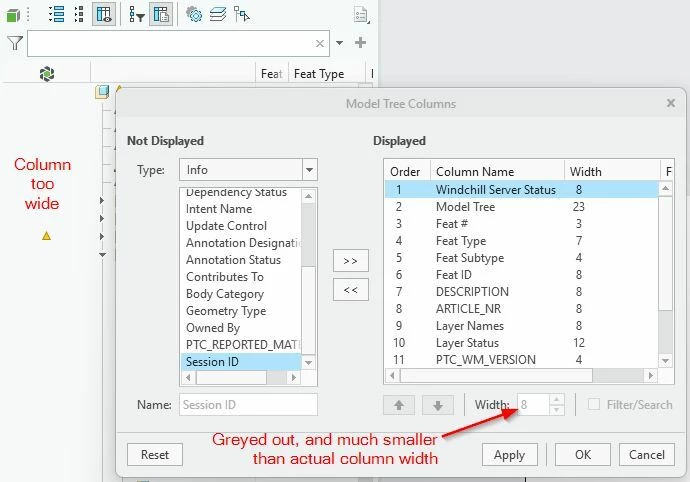
What is wrong? What should we change to bring the column width of "Windchill Server Status” back to 8?

    2 replies

    Catalina
    Community Manager
    Nov 3, 2026 2:44 PM UTC

    Hi ​@andrehj 
     
    Thank you for your question.  
     
    Your post has not yet received any response. I am replying to raise awareness. Hopefully, another community member will be able to help. 
     
    Also, feel free to add any additional information you think might be relevant. It sometimes helps to have screenshots to better understand what you are trying to do. 

    Thanks, 

    Translate
    Catalina | PTC Community Manager
    MikeBennett
    17-Peridot
    Nov 3, 2026 7:38 PM UTC

    Hi ​@andrehj,


    Have you attempted to select the Reset button in the bottom left of your image?  You may need to reapply the columns after reset.


    CS31632 suggests the first column cannot be set in session but you can save the tree to a .cfg file, use a text editor to set the desired width, then import the modified .cfg file


    Translate