
1-Visitor
December 28, 2020
Solved

CREO 4.0 UNABLE TO ACCESS DIMENSION PROPERTIES

  • December 28, 2020
  • 1 reply
  • 4690 views

Hi, 

In order to add Dia symbol or parenthesis, usually i used to right click and get in to properties. now i am not able to see properties in the right click. also unable to click dimension text which will bring pop up.does any one has similar experience? all the drawing i am facing same issue? 
Best answer by MartinHanak

@gkarthikyn wrote:

When i click the dimension text , that pop up dialogue box is not appearing. i used to get that before but yesterday pop up dialogue box it not coming up. in Right click i am not getting properties in the menu that appears after right click. Not sure why suddenly it disappeared?   


Hi,

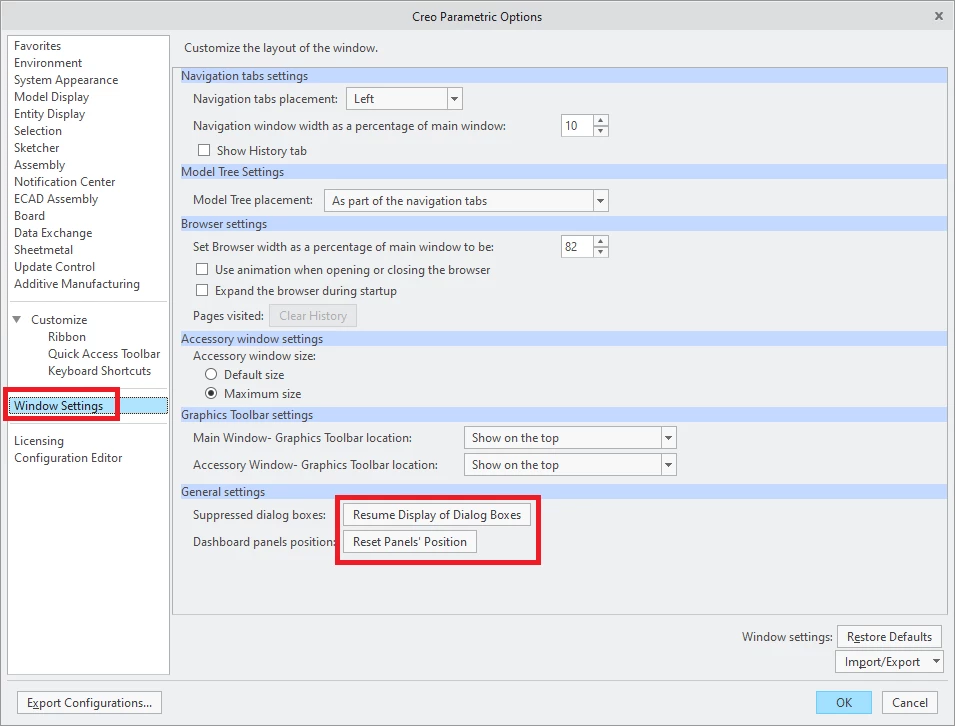
try resetting UI.

File > Options

ui_reset.png

1 reply

KenFarley
21-Topaz II
December 28, 2020

Creo 4 has a different interface than what you are apparently used to. To edit a dimension text and all that stuff you select the dimension of interest and then one of the ribbon entities will be "Dimension Text" (four in from the right). Click on that and dialog box will appear that lets you edit the text.

Is it better? I don't know. Different, I suppose.

1-Visitor
December 29, 2020

Hi,


In this case , Even Dimension text is not working for me.

24-Ruby III
December 29, 2020

@gkarthikyn wrote:

Hi,


In this case , Even Dimension text is not working for me.


Hi,

in Creo Parametric 4.0 you should see this ...

dim.png