
6-Contributor
October 5, 2017
Question

Creo 4 - Datum Feature Symbols and Dimension Arrows Disapearing

  • October 5, 2017
  • 3 replies
  • 10174 views

When I attach a Datum Feature Symbol to a drawing dimension (Creo 4, M030) and them move the symbol, one arrowhead of the dimesion I place the symbol on will disapear. After it's gone, there is no way that I can find to bring it back.

Anyone else see this and have you come up with a workaround?
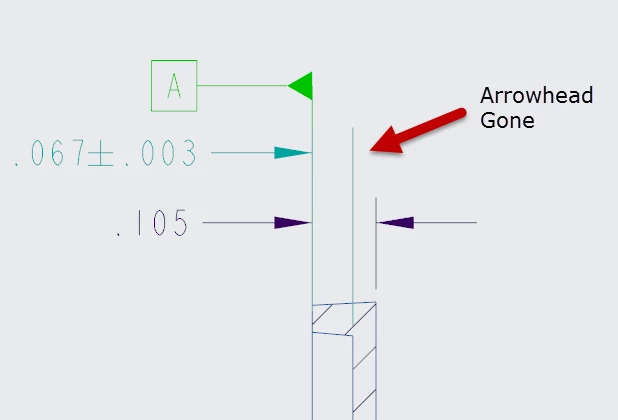
2017-10-06_8-48-15.png

3 replies

24-Ruby III
October 6, 2017

Hi,


at the moment your video is waiting for approval and is not available. Please upload some example data for testing purposes.

Adam_Haas6-ContributorAuthor
6-Contributor
October 6, 2017

I added an image that should help. It's pretty simple, attach a Datum Feature Symbol to a dimension witness line and then move the symbol. You'll see that one of your arrow heads disapears... Really just wondering how people are getting around this as I cannot believe it isn't affecting other users.

23-Emerald III
October 6, 2017

To be honest, I don't think there has been widespread adoption of Creo 4 at this point. Large companies tend to wait to upgrade for a significant amount time so the "bugs" have been worked out by the guinea pigs!

18-Opal
October 6, 2017

Try setting the drawing option update_drawing to all, to see if that helps.  Otherwise, open a case with Technical Support.


Amit

24-Ruby III
October 8, 2017

Hi,


from my point of view setting drawing option update_drawing to all does not make any sense, because the problem is reproducible in new drawing. The option is usually used to repair old drawings.

1-Visitor
October 8, 2017

By moving the Datum Feature Symbol you are converting the symbol from applying to the thickness of the feature to the surface of the part; it breaks a Feature of Size reference.


The defect isn't that the dimension arrow is gone, it's that Creo is letting you move the Datum Feature Symbol at all. Creo should move the dimension and Datum Feature Symbol together or force you to delete the Datum Feature Symbol Annotation. It should not let you relocate the Annotation by itself.


I expect if you do delete the Annotation that the other dimension arrowhead will return.

Adam_Haas6-ContributorAuthor
6-Contributor
October 9, 2017

In the view this DFS is being placed (and in most other views), the "surface" it is applied to cannot be selected (and you cannot select an edge) so the dimension witness line is the only option.

Prior to Creo 4, we would show the set Datum, then move it into the position we needed. It seems in Creo 4 I cannot move my DFS. Hopefully PTC has a solution soon.

1-Visitor
October 9, 2017

I create/apply all annotations in the model and showed them on the drawing. The drafting part of Creo has always had trouble with FCFs and Datum Feature Symbols.