8-Gravel
Apr 21, 2017 4:22 PM UTC
Solved

Creo 4 - How do I delete a table row?

This seems like a basic question, but I can no longer delete table rows in my drawings.  Columns are easy (RMB > delete).  Rows I'm at a loss.  Can anyone help me?

cgorniAnswer
16-Pearl
Dec 2, 2021 2:19 PM UTC

To close this community thread on Deleting a table row in a drawing or format


Summary of the exchanges and list of solutions proposed:

  • For simple tables:
    • Right Mouse Button (RMB) few times to highlight and select the table row.
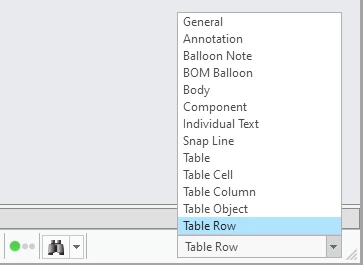
    • You can also set the Selection Filter at the bottom right to directly pick the row
    • cgorni_0-1638454580166.png
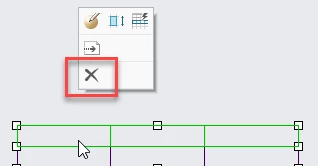
    • Then hit the Delete button from the keyboard or the Creo mini toolbar command.
    • cgorni_1-1638454594809.png
    • See also article CS67996
  • For tables with repeat regions including the row:
    • If the unwanted row leads to several empty lines (see CS35657) :
      • Remove repeat region
      • Remove unwanted table row
      • Recreate repeat region
    • If a the row represents a specific item of the region, you may want to filter the line, see article CS48035

9 replies

1-Visitor
Apr 21, 2017 4:28 PM UTC

RMB few times till the row highlights in cyan... or set the selection filter. Select the row and hit the Delete button from keyboard.

Translate
8-Gravel
Apr 21, 2017 4:39 PM UTC

That doesn't work in Creo 4

Translate
Mahesh_Sharma
22-Sapphire I
Apr 21, 2017 4:44 PM UTC

John,

The table which you are referring is standard table or repeat region table?

Translate
cgorni16-PearlAnswer
16-Pearl
Dec 2, 2021 2:19 PM UTC

To close this community thread on Deleting a table row in a drawing or format


Summary of the exchanges and list of solutions proposed:

  • For simple tables:
    • Right Mouse Button (RMB) few times to highlight and select the table row.
    • You can also set the Selection Filter at the bottom right to directly pick the row
    • cgorni_0-1638454580166.png
    • Then hit the Delete button from the keyboard or the Creo mini toolbar command.
    • cgorni_1-1638454594809.png
    • See also article CS67996
  • For tables with repeat regions including the row:
    • If the unwanted row leads to several empty lines (see CS35657) :
      • Remove repeat region
      • Remove unwanted table row
      • Recreate repeat region
    • If a the row represents a specific item of the region, you may want to filter the line, see article CS48035
Translate
kdirth
21-Topaz I
Dec 2, 2021 2:44 PM UTC

You can also hover the mouse pointer to the right or left of the row for preselection highlight of the row, then select and delete.  Directly if in Table tab and by pressing Alt outside of Table tab.

Translate
There is always more to learn.
1-Visitor
Sep 24, 2022 9:29 AM UTC

<span;>You can choose FILTERS option in repeat region! In FILTERS option, there is two types: one is BY RULE & other is BY ITEM.
<span;>Now choose BY ITEM, it shows 3 types of FILTER ITEM. By default, it is in EXCLUDE option. Now choose the row you need to delete and click done!

Translate