
9-Granite
March 8, 2021
Solved

Creo 4. IFX intelligent fastener defaults to previous hardware size

  • March 8, 2021
  • 1 reply
  • 2249 views

Hello,

   I am using Creo 4 and trying to use IFX ( intelligent fastener exchange) tool to swap the hardware. On a hole size of 9mm dia, the tool picks the M8 bolt which is correct. And if i go to another hole of 5mm dia the tool still defaults to M8 bolt size which i think it is memorizing the previous execution selection and defaults to same hardware. 

Is this a bug ? or any config settings i can look into . 


Thank you in advance 

Arun 
Best answer by Tdaugherty

I'm not sure if I can comment on the intended functionality but I'm seeing the same thing. This can be helpful if you're putting in fasteners that are all the same size but inconvenient if you need to change sizes. Luckily, there is a quick way of doing this. There's an autosize option that will adjust the size of your fastener based on the mating hole size.


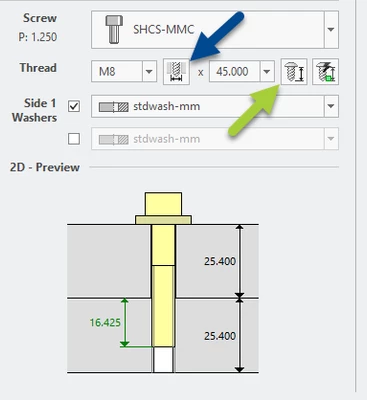
Select the "Measure a diameter" option (blue arrow) and then select the hole (ID) you want to put the new fastener on. IFX will autosize the fastener based on the diameter of the hole. The hole you're measuring needs to exist so this isn't going to work in every application but it's helpful.


It's also worth mentioning that the length can be set automatically (green arrow) to adjust thread engagement between two mating components. The preview will show a green dimension if the engagement is set properly.


Tdaugherty_0-1615235316371.png


1 reply

16-Pearl
March 8, 2021

I'm not sure if I can comment on the intended functionality but I'm seeing the same thing. This can be helpful if you're putting in fasteners that are all the same size but inconvenient if you need to change sizes. Luckily, there is a quick way of doing this. There's an autosize option that will adjust the size of your fastener based on the mating hole size.


Select the "Measure a diameter" option (blue arrow) and then select the hole (ID) you want to put the new fastener on. IFX will autosize the fastener based on the diameter of the hole. The hole you're measuring needs to exist so this isn't going to work in every application but it's helpful.


It's also worth mentioning that the length can be set automatically (green arrow) to adjust thread engagement between two mating components. The preview will show a green dimension if the engagement is set properly.


Tdaugherty_0-1615235316371.png


adoppala9-GraniteAuthor
9-Granite
March 9, 2021

Daugherty,

              Thank you suggesting work around option to use auto select button, When i tried the same, selected auto select diameter button and choose the diameter of the hole. still the bolt size will not update or change.  In the example below the hole diameter is 5mm and the IFX tool draws M12 bolt and will not change even with the auto select button

adoppala_0-1615255018775.png


Thank you,

Arun 

adoppala9-GraniteAuthor
9-Granite
March 10, 2021

In the previous example. I figured out one senario. If the correct size hardware not available in the library , then the tool defaults to previous hole size. 

In this case it would be better if the tool can give an error saying No hardware available and also show the preview picture showing the interference.  something if PTC can think of 


Pictorial representation in IFX tool dialogue boxPictorial representation in IFX tool dialogue boxActual interference with oversize hardwareActual interference with oversize hardware