
10-Marble
August 21, 2022
Question

CREO 8: model tree is seperated and the layer tree doesn't show by default when opening a new file.

  • August 21, 2022
  • 4 replies
  • 4461 views

We are migrating to creo 8 and noticed when the Model tree is separated in a different window, the left window is not showing the layer tree by default as it shows the FOLDER BROWSER instead (IMO, useless at this point).


How do i get Creo to show the Layer tree everytime i open new windows?   I can not seem to find the answer to my Q in the help or support pages.  


Creo 5 shows the Layer display on the left and Model tree floating on the right. each time I open a new window.  Since I work in the routed systems stuff, all I ever do is switch between parts and assemblies all day long.  I dont care for having to turn the Layer tree on every time (2 extra clicks everytime I open a window)
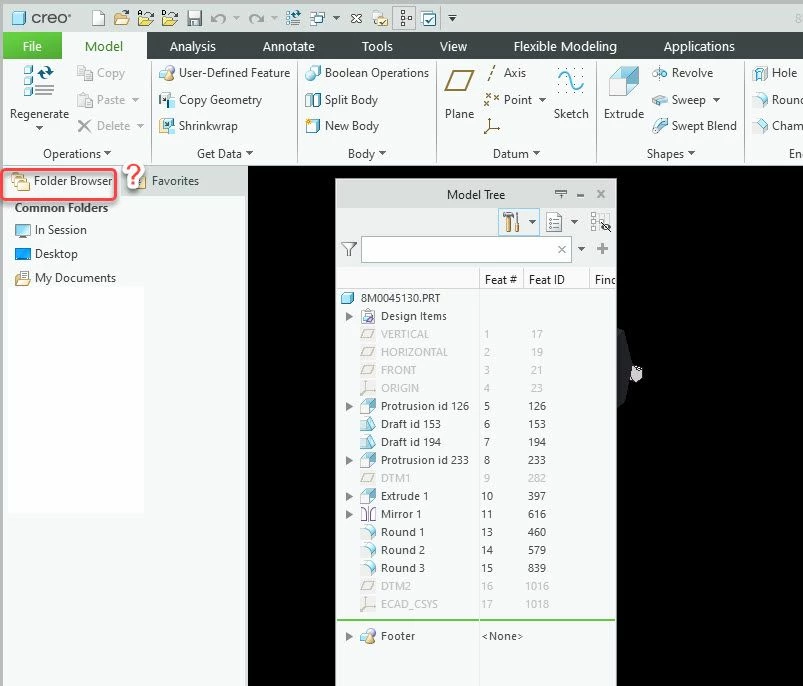
2022-08-21_12-23-24.jpg


4 replies

tbraxton
22-Sapphire II
22-Sapphire II
August 21, 2022

Creo 8 has added enhancements to the tree (model, & layer) and  added design elements.


Check out these support items for Creo 8.

Tree enhancements

https://support.ptc.com/help/creo/creo_pma/r8.0/usascii/#page/whats_new_pma/ux-model_tree_enhancements_side_by_side_ui.html# 


How to display Model Tree and Layer Tree as two separate floating windows in Creo Parametric

https://www.ptc.com/en/support/article/CS146154 

24-Ruby III
August 22, 2022

Hi,

I think that requested functionality is not implemented, Please read https://www.ptc.com/en/support/article/cs364177 article.

15-Moonstone
September 21, 2022

Is it possible to save the Display Configuration so that the model tree and the Layer tree show by default when Creo 8 is launched like in the image below so one doesn't have to enable the layer tree for every model and drawing they open?

danders238_0-1663773358426.png

Thanks for any help you can provide,

Don A

23-Emerald III
September 21, 2022

Have you tried saving the model tree settings then adding the mdl_tree_cfg_file <filename model tree settings>

I don't have creo 8 so I can't test if that is a setting that gets saved

24-Ruby III
September 21, 2022

@StephenW wrote:

Have you tried saving the model tree settings then adding the mdl_tree_cfg_file <filename model tree settings>

I don't have creo 8 so I can't test if that is a setting that gets saved


Hi,

mdl_tree_cfg_file option is obsolete. Settings are saved into .ui file (if it is implemented by PTC).

pete300010-MarbleAuthor
10-Marble
January 25, 2023

No solution yet.  thanks.

1-Visitor
May 20, 2024

I have Creo 8.0 and the model tab is missing only when I bring up a model.  When I create a new part the model tree tab is there.


KC_10661254_0-1716237220046.png


15-Moonstone
May 20, 2024

I find that when I have a model open and it's not the latest model in the display list of models open  and try to open another model directly from the workspace, the model tree won't display until I make the model the active model in session.  Once I make it active the model tree displays correctly.  I believe this is as PTC intended it to work.

Don A