10-Marble
Apr 1, 2025 7:30 PM UTC
Question

CREO assembly drawing x-hatching problem with save-as PDF

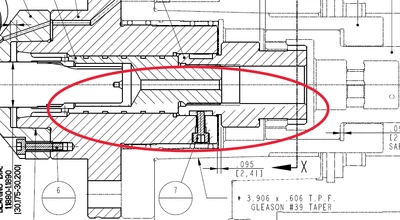
We've been having a problem lately with assembly drawing x-hatching not looking correct after save-as to PDF.  This seems to have happened since maybe CREO 9, possibly earlier.  But it seems to get worse with each release.  It starts out with an assembly drawing with x-hatching.  It looks fine.  But when we save-as to PDF, the x-hatching looks messed up.  I have attached some screen shots of the PDF showing x-hatching not looking correct.  This is not the only drawing it happens on.  It happens   Currently using CREO 10.  

Thanks in advance.
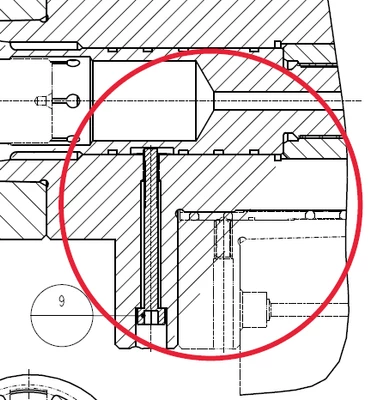
 

Screenshot 2025-04-01 151027.png

Screenshot 2025-04-01 151000.png

4 replies

24-Ruby III
Apr 2, 2025 6:52 AM UTC

Hi,

I think you have to publish pictures of Creo window containing specific drawing, too.

Translate
DCG10-MarbleAuthor
10-Marble
Apr 2, 2025 2:24 PM UTC

The drawing in CREO before saving to PDF. 

Screenshot 2025-04-02 071734.png

Screenshot 2025-04-02 071649.png

Translate
24-Ruby III
Apr 2, 2025 2:36 PM UTC

Hi,

it seems to me there is an interference between components in the assembly.

Just for testing purposes ... can you hide interfering components and generate PDF?

Translate