

11-Garnet
April 3, 2025
Solved

CREO Bend allowance tables

  • April 3, 2025
  • 2 replies
  • 1362 views

Hello,

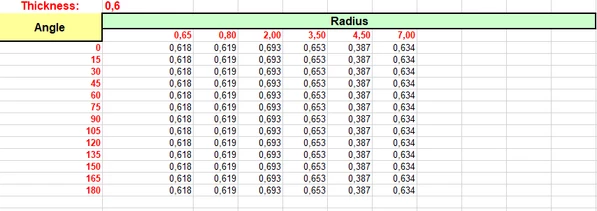
We received from customer Bend table in format which SolidWorks read well, 
BG_10764760_0-1743684437161.png

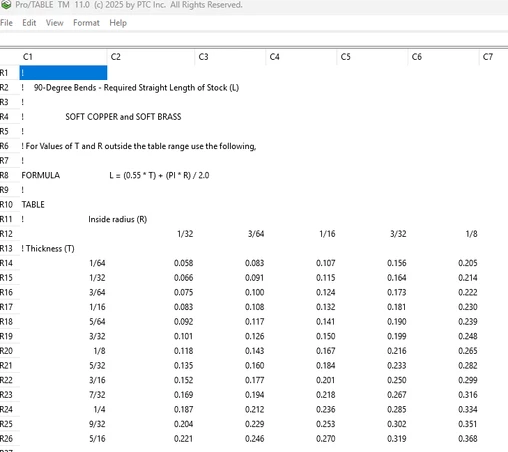
so we are trying to apply that in Creo (Creo 11.0.3), but as we noticed Creo has a little bit different format. It has radius and thickness and values inside are bend allowance if i understood correctly, and the table from SW have thickness, radius , bend angle (which is not affecting k-factor if u see table, so it can be ignored), and k factor as value derived (0.618, 0.619, 0.693....).
BG_10764760_1-1743684540435.png


Does anyone know how that should be applied in Creo and have maybe some examples, or is bend table a right way in Creo to apply this.
Best answer by Branko_Gajovic

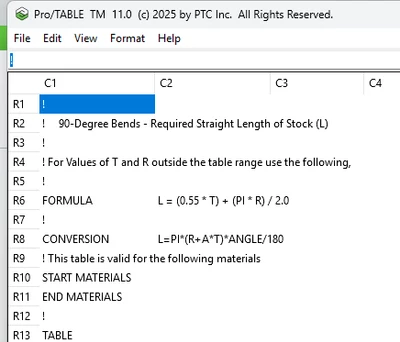
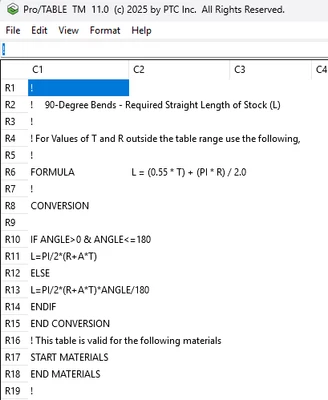
Thanks for your answers because i didn't get it from much people 😁. I was a bit busy and didn't have time to reply (on my own message), because it felt at some point like PTC community is a ghost town, than @Catalina  and @DB@HuscoInt replied and reminded me that this topic is still alive. You were on the right track, but in your example interpolated values (A) are L (which i figured it out at some point), so for people who might read this post if they want to have k-factor read from table not directly Bend Allowance, you will need to have conversion formula. When you don't have conversion formula L=A (A=Interpolated values inside table) by default. So CREO system formula is L=PI*(R+k*T)*θ/180, and when you use conversion formula you swap k with A, so the k-factor will be read from table, and it looks like this L=PI*(R+A*T)*θ/180 (Pic1)If your conversion formula is a bit complicated you need to put end conversion at then end of you relation (Pic2). So i will Accept this as a Solution to close this Topic.

Branko_Gajovic_0-1744269399478.png

Branko_Gajovic_2-1744269699201.png


2 replies

Catalina
Community Moderator
April 9, 2025

Hi @bg_01_10764760 

Thank you for your question. 

Your post appears well documented but has not yet received any response. I am replying to raise awareness. Hopefully, another community member will be able to help.

Also, feel free to add any additional information you think might be relevant. It sometimes helps to have screenshots to better understand what you are trying to do.


Best regards,

Catalina | PTC Community Moderator
DB@HuscoInt
12-Amethyst
April 9, 2025

Attached is a sample I created based on your screenshots. Creo’s bend tables typically don't vary by angle only by thickness and radius. This is why I removed all the angle rows because the values are identical. I could not upload the file as a .ptb so you will have to rename from .txt to .ptb.

Branko_Gajovic11-GarnetAuthorAnswer
11-Garnet
April 10, 2025

Thanks for your answers because i didn't get it from much people 😁. I was a bit busy and didn't have time to reply (on my own message), because it felt at some point like PTC community is a ghost town, than @Catalina  and @DB@HuscoInt replied and reminded me that this topic is still alive. You were on the right track, but in your example interpolated values (A) are L (which i figured it out at some point), so for people who might read this post if they want to have k-factor read from table not directly Bend Allowance, you will need to have conversion formula. When you don't have conversion formula L=A (A=Interpolated values inside table) by default. So CREO system formula is L=PI*(R+k*T)*θ/180, and when you use conversion formula you swap k with A, so the k-factor will be read from table, and it looks like this L=PI*(R+A*T)*θ/180 (Pic1)If your conversion formula is a bit complicated you need to put end conversion at then end of you relation (Pic2). So i will Accept this as a Solution to close this Topic.

Branko_Gajovic_0-1744269399478.png

Branko_Gajovic_2-1744269699201.png