
4-Participant
January 22, 2024
Question

Creo Cabling .NWF ignoring thickness

  • January 22, 2024
  • 1 reply
  • 860 views

Hello,


I have an .NWF file that I have generated using a script, and it ignores all thickness/gauge/csa values that I put into it, and creo consistently lists all thicknesses for each wire as being 14.8221mm. for example, here's an excerpt of one of my new wires- 

NEW WIRE_SPOOL BLACK
PARAMETER TYPE WIRE
PARAMETER COLOR BLACK
PARAMETER WIRE_CSA 0.5

PARAMETER THICKNESS 0.8

PARAMETER WIRE_GAUGE 16

etc. 


I have MANY wires, all with different gauges, and they all show up as spools with these dimensions:
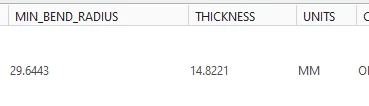
ER_10877782_0-1705953360443.png


I can't edit them either, and no changes in the .nwf change anything in creo. I'd greatly appreciate help here. thanks!

1 reply

14-Alexandrite
January 25, 2024

Hi,


You definitely have something strange going on there...

I tried the single spool you listed


NEW WIRE_SPOOL BLACK
PARAMETER TYPE WIRE
PARAMETER COLOR BLACK
PARAMETER WIRE_CSA 0.5
PARAMETER THICKNESS 0.8
PARAMETER WIRE_GAUGE 16


and in creo 9.03 it looked OK and all parameters were editable...

The min_bend_radius seems to default to zero and perhaps you should have MM or INCH parameter as well. In my case the units defaulted to MM.

Lars_F_0-1706172013848.jpeg


Do you clear the old logical references and delete the old spools in your test assembly before you read the new logical nwf-file? Try to import the latest nwf to a new assembly and see if anything changes.


Br,

Lars