
10-Marble
September 25, 2023
Solved

Creo distribution tool (nmsd) exe doesnt terminate even after conversion is over

  • September 25, 2023
  • 1 reply
  • 5143 views

hi,

My Java code calls a bat file which runs the Creo Distribution utility and gets notified when "nmsd.exe" (PTC service for conversion) gets created.

Here is the bat file:

"%CREO_BASEDIR%\ptcdbatch.bat" -nographics -process C:\temp\convert\conversion.dxc


And the conversion.dxc file is as below:

<DXC>
  <Windchill></Windchill>
   <Group DSQM="_LOCAL" Name="IGES 3D Export" Output="2" OutputDir="C:\temp\convert"  PrimaryContent="0" TTD="C:\temp\convert\iges_3d_export.ttd.def" VaultResults="0">
  <Object>C:\temp\convert\PartFile.prt.1</Object>
 </Group>
</DXC>


When the bat file is run, "nmsd.exe" gets called and the part file is converted to the .igs file.

But even after the conversion is complete and the log file shows "successful" conversion, the nmsd.exe doesn't get terminated and remains for sometime. Because of this my Java code couldn't understand if the conversion was over successfully.

Is there a way to terminate nmsd.exe immediately after the conversion? We can't exactly specify if a particular file would take a  minute or 5 minutes to get converted. So its best that the nmsd.exe terminates on its own after the conversion and don't linger in the task manager.


Thanks in Advance.


Best answer by MartinHanak

@MN_10661566 wrote:

Creo10.0.0.0


Hi,

I defined personal environment variables ... see env_var.mp4 video

DBATCH_FORCE_CREO_RESTART = Y

NMSD_TIMEOUT = 15


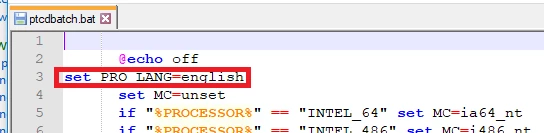
I modified ptcdbatch.bat

MartinHanak_0-1695817788449.png


I started ptcdbatch.bat  and run mytask.dxc

<DXC>
 <Windchill/>
 <Group DSQM="_LOCAL" Name="IGES 3D Export" Output="2" OutputDir="E:\users\creo10_parametric" PrimaryContent="0" TTD="E:\PTC\Creo10_000\Creo 10.0.0.0\Common Files\text\ttds\iges_3d_export.ttd" VaultResults="0">
 <Object>E:\users\creo10_parametric\brick.prt.1</Object>
 </Group>
</DXC>


nmsd.exe disappeared after expected timeout.


Note:

I think it would be better to check, whether xtop.exe process exists. Because of DBATCH_FORCE_CREO_RESTART = Y Creo session ends when task is finished.


1 reply

24-Ruby III
September 26, 2023
10-Marble
September 26, 2023

Thanks Martin, but I missed to mention that we did try this setting.

We kept the timeout as 2 mins in PTC startup file. (cocreatesim.psf and parametric.psf)

ENV=NMSD_TIMEOUT=120

This was why I was surprised, that even after setting it as 2mins , the nmsd.exe still takes more than 5mins to terminate.

I initially thought this was an issue on my system only. But than my colleague too confirmed the same. This is irrespective of my Java code- even if he sets the nmsd timeout to less than 1 or 2 mins, it still takes around 5 or 7 mins to terminate in his system.


24-Ruby III
September 26, 2023

@MN_10661566 wrote:

Thanks Martin, but I missed to mention that we did try this setting.

We kept the timeout as 2 mins in PTC startup file. (cocreatesim.psf and parametric.psf)

ENV=NMSD_TIMEOUT=120

This was why I was surprised, that even after setting it as 2mins , the nmsd.exe still takes more than 5mins to terminate.

I initially thought this was an issue on my system only. But than my colleague too confirmed the same. This is irrespective of my Java code- even if he sets the nmsd timeout to less than 1 or 2 mins, it still takes around 5 or 7 mins to terminate in his system.


Hi,

in my Creo 9.0.2.0 I opened parametric.psf and modified timeout value on line no.17.

ENV=NMSD_TIMEOUT=15

I started and ended Creo session.

nmsd.exe disappeared 25 seconds after Creo session end.


Please do the same test.