

Creo drawing datum curve from equation inaccurately
I'm modelling a Haack Series Nose cone. The nose cone equation for the curve is:
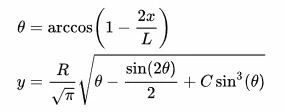
This is the equation for the datum curve that I have in Creo thanks to the people who helped me in a previous thread where I could not get the equation to draw near the bounds:
R = 49
L = 560
z = t
y = ( R / sqrt ( PI ) ) * sqrt ( ( acos ( 1 - ( 2 * t / L ) ) ) * pi / 180 - sin ( 2 * acos ( 1 - ( 2 * t / L ) ) ) / 2 )
x = 0.0
So here is the problem: zooming in where the observed segment of the curve spans about 10 mm of length, there appears to be a small concave segment and the tip seems to blunt abruptly:
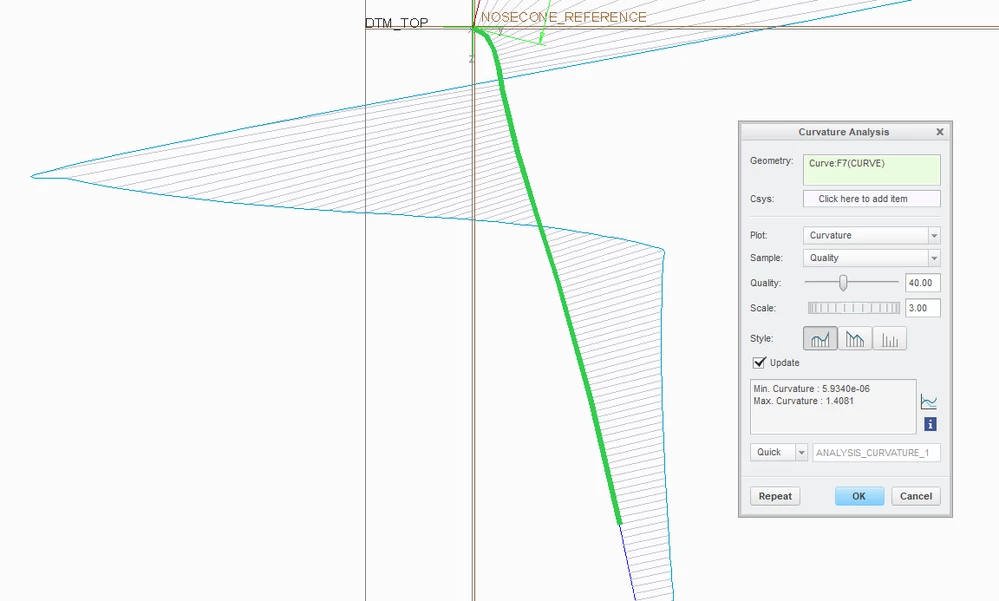
The gradient should always be decreasing, yet by visual inspection and the curvature analysis tool, we can see this is not the case.
This is how the shape should look:
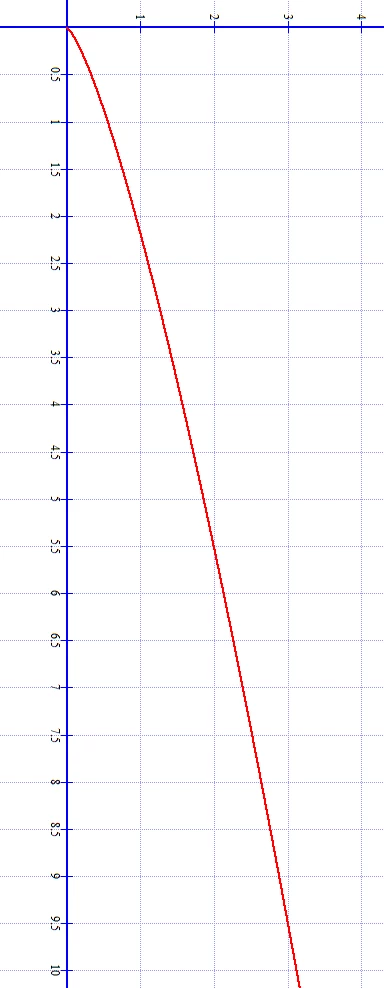
I've attached an excel plot of what the values should be for the length of the cone. Creo more or less agrees with the numbers until it gets within less than 20 mm of the tip where the concavity and weirdness starts happening.
Why is this happening 😞 ?
