
6-Contributor
November 18, 2025
Question

Creo drawing objects export to pdf

  • November 18, 2025
  • 1 reply
  • 398 views

When exporting a 2D creo drawing to PDF, the microsoft word objects that are inserted are not selectable text in the final PDF.  Is there a setting so that inserted objects are selectable/highlightable in the resulting PDF?


Inserting an object in this way, but it seems to come into the 2D drawing as an image and not text/table.
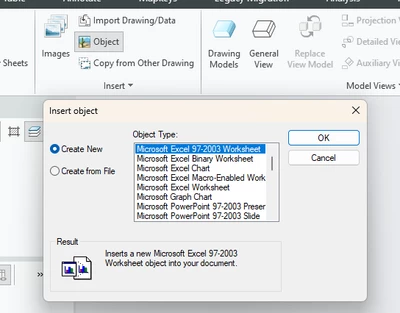
CB_11916535_0-1763494216438.png


1 reply

14-Alexandrite
December 1, 2025

The objects thus inserted come in as an OLE object. Meaning they remain as a Native file (Word, Excel etc). For Notes one may keep Standard Notes for Drawing in a Text file and ask Creo to read from the file or copy--> Paste those texts. Drawings converted to PDF using above would have 'Selectable Text'.

For Spreadsheets.... Create a Creo Table.

6-Contributor
December 1, 2025

So there is no way to save a 2D drawing to PDF where OLE objects are selectable objects?  Or there is no setting in Creo that makes OLE objects selectable text before saving?

14-Alexandrite
December 2, 2025

Check out these settings.


Setting NameDescriptionValueDefault Value
intf2d_out_acad_mtextCreate a single MTEXT entity for multi-line text notes when is set to YES.yes, noyes
intf2d_out_acad_norm_lead_blockYes - Multiple normal leader annotations are exported to DWG and DXF file formats as blocks. No - Multiple normal leader annotations are exported to DWG and DXF file formats as separate entities.yes, noyes
intf2d_out_acad_ole_as_imageControls OLE export to DXF/DWG. Yes - exports OLE objects as DXF/DWG IMAGEs. No - exports OLE objects as separate entities.yes, noyes
intf2d_out_acad_splinesControls whether splines are converted to corresponding DXF/DWG entities or exported as polylines.as_spline, as_polylineas_spline
intf2d_out_acad_sym_block_nameDetermines whether symbol definition or symbols instance names are used as block names in DXF/DWG export when symbols are mapped to blocks. SYM_DEF - symbol definition names are used, SYM_INST - symbol instance names are used.sym_def, sym_instsym_def
intf2d_out_acad_text_alignAs_is - Exports notes to DXF/DWG with their original alignment values. Fit - Exports notes with FIT alignment.as_is, fitas_is