


Question
Creo Elements Direct Drafting 18.1 - RMB context menu icons don't match command
Maybe this havs already been reported and fixed in V19.
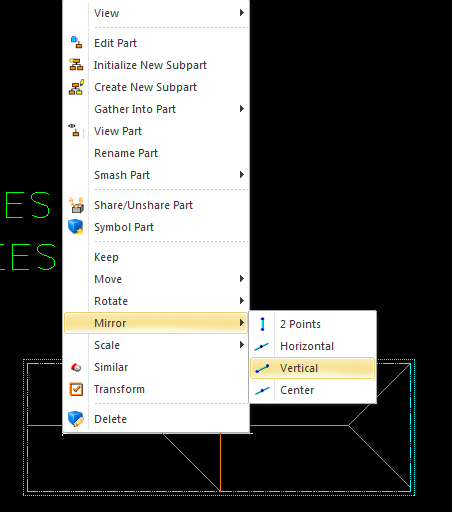
When selecting an object and RMB to start Mirror from context menu, I noticed that the icons don't match the command.
For instance, you can select Vertical and it will mirror vertically on selected point. It's just the icon that doesn't match.
I also noticed the same mistake for other operations.
On the subject of context menus, how can they be modified to add commands?
In Modeling you can select the File menu and select Customize. Someone forgot to add this to the menu in Drafting.
Thanks,
Mike
This thread is inactive and closed by the PTC Community Management Team. If you would like to provide a reply and re-open this thread, please notify the moderator and reference the thread. You may also use "Start a topic" button to ask a new question. Please be sure to include what version of the PTC product you are using so another community member knowledgeable about your version may be able to assist.