

Creo Parametric 2.0, How do I use the identical dimensioning scheme?
I am working my way through The Creo Parametric 2.0 Tutorial book and am having trouble getting started with the chapter 7 exercise.
To begin the exercise you need to create an extruded protrusion that is 12 X 20 X 2 rectangular base. Then you need to extrude a protrusion near the front left corner of the base feature just created. This is a cylindrical protrusion of diameter 2 and height 1. The instructions then say to be sure to use the identical dimensioning scheme.
My Question:
How do I use the identical dimensioning scheme?
Purpose for Question:
The next step in the exercise is to click on the cylindrical protrusion and select in the Model ribbon {Model Intent}: Switch Symbols
However, the option of Switch Symbols is not displayed. But instead Switch Dimensions is shown.
Thanks for any help you can offer.
-Drew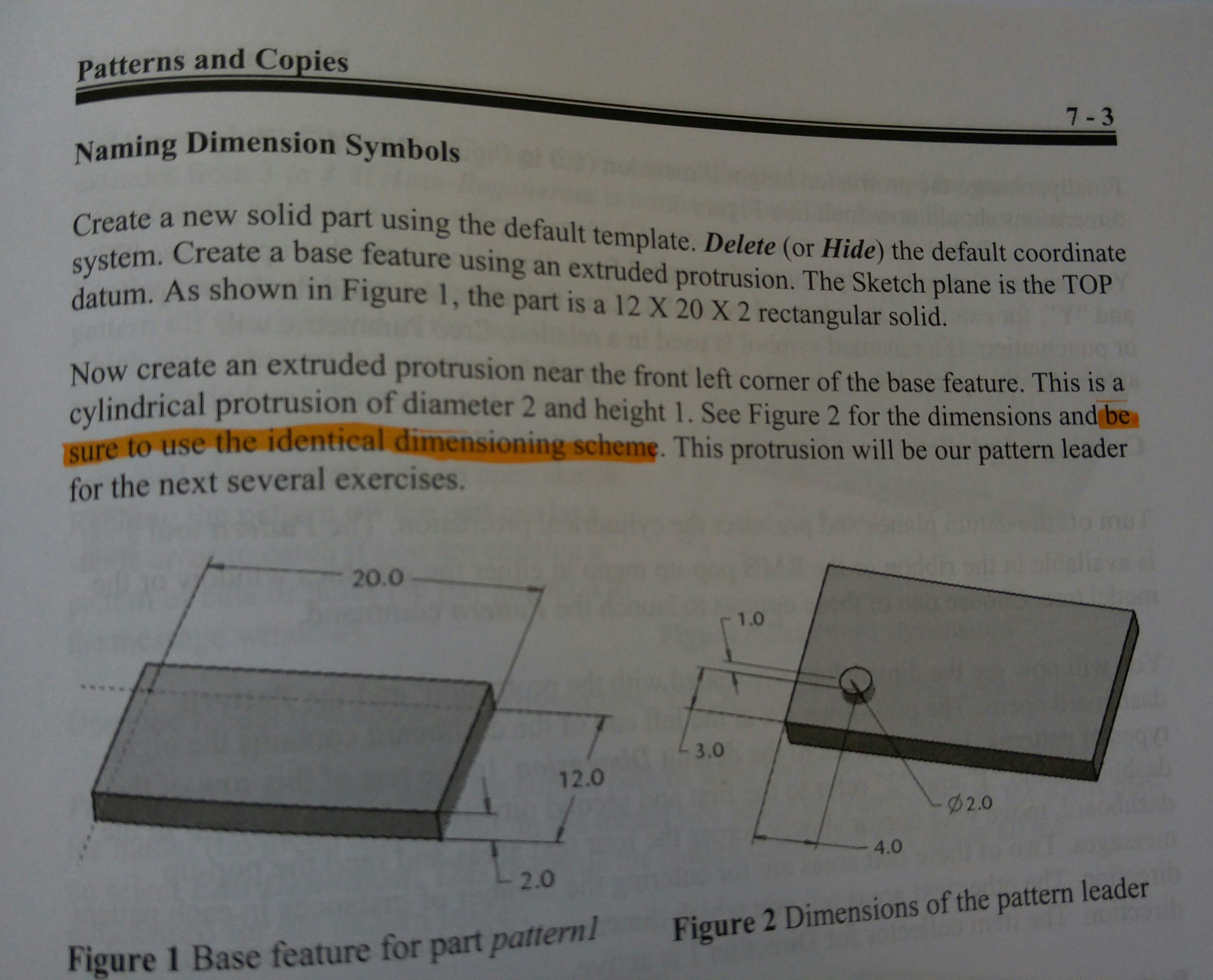
This thread is inactive and closed by the PTC Community Management Team. If you would like to provide a reply and re-open this thread, please notify the moderator and reference the thread. You may also use "Start a topic" button to ask a new question. Please be sure to include what version of the PTC product you are using so another community member knowledgeable about your version may be able to assist.