7-Bedrock
August 10, 2023
Solved

Creo schematics XML version into cabling drawing

  • August 10, 2023
  • 2 replies
  • 1476 views

Hello everybody,


I am creating a design of wiring harness in schematics and I would like to do a flat harness drawing in creo cabling afterwards. Is there a way how to display in flat drawing version of XML file which was used for creation of 3D harness?


Eg. if I export file from schematics named XMLdesign012023.xml and then import it into creo cabeling. Can I automatically in creo flat harness drawing display something which says Design based on: XMLdesign012023.xml


I can write it manually, but we are more people working on the harnesses so there is a change that someone will forget and than we are not able to know what was the source and if the design from schematics is reflected in drawing or not


I normally use repeat region feature to view cabling parameters at drawing, could it be done in similar way? Or maybe via parameters?


Thanks everyone for answers
 

Best answer by Lars_F

Hi,


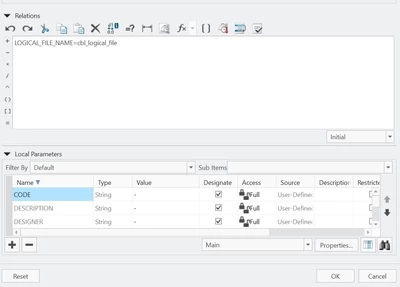
There is a creo relation function named "cbl_logical_file".


With that relation you can add a parameter to your assembly e.g.

Lars_F_0-1692176879075.png


In a drawing you can then create a table where you display this parameter e.g.

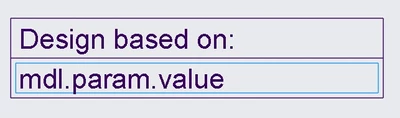
Add a report parameter "&mdl.param.value"

Lars_F_1-1692177146328.png


Add a filter for the repeat region... "&mdl.param.name == LOGICAL_FILE_NAME"

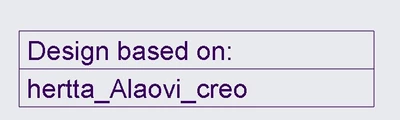
Then you can have a table that looks like... (My xml file was named "hertta_Alaovi_creo.xml")


Lars_F_2-1692177162108.png


You can propagate this parameter to your subcomponents (harness parts or other) with these instructions (not normally needed)...

Lars_F_3-1692177390647.png

Br,

Lars


2 replies

5-Regular Member
August 16, 2023

Hi LK_10080738,

Thank you for your question.

I encourage you to bring more details and context to your initial inquiery. For example, screenshots are useful to better understand what you are trying to do and will also increase your chance to receive meaningful help from other Community members.


Lars_F14-AlexandriteAnswer
14-Alexandrite
August 16, 2023

Hi,


There is a creo relation function named "cbl_logical_file".


With that relation you can add a parameter to your assembly e.g.

Lars_F_0-1692176879075.png


In a drawing you can then create a table where you display this parameter e.g.

Add a report parameter "&mdl.param.value"

Lars_F_1-1692177146328.png


Add a filter for the repeat region... "&mdl.param.name == LOGICAL_FILE_NAME"

Then you can have a table that looks like... (My xml file was named "hertta_Alaovi_creo.xml")


Lars_F_2-1692177162108.png


You can propagate this parameter to your subcomponents (harness parts or other) with these instructions (not normally needed)...

Lars_F_3-1692177390647.png

Br,

Lars