


Question
Croe 7.0 Drafting of Chamfer Features
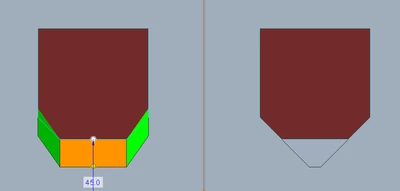
I was "upgraded" from 4.0 to 7.0.5.0 one week ago and have run into an issue with creating drafts. PTC has added several features to the draft function to deal with rounds and chamfers. Now it does not work as expected. I created a square pocket, put chamfers in 2 corners and want to draft all sides independently. The default setting interprets the chamfer as seen in the left pocket. The right pocket was created by drawing the chamfers in the pocket sketch and drafts as expected.
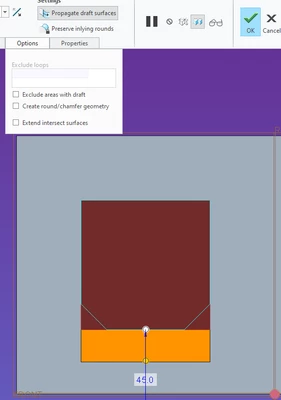
When I uncheck "Create round/chamfer geometry" the chamfers disappear as shown in second image.
Is there anything I am missing or is this a BUG in Creo 7.0?