

14-Alexandrite
November 25, 2024
Question

Crossec text font

  • November 25, 2024
  • 3 replies
  • 1570 views

Hello,

is it possible to manage default font type/size/linestyle for cross sections?

I want to follow technical drawing stadards in my country but Creo always use default font/color/linestyle for section name which is not correlating with cross section default arrow style (because it is just a note).
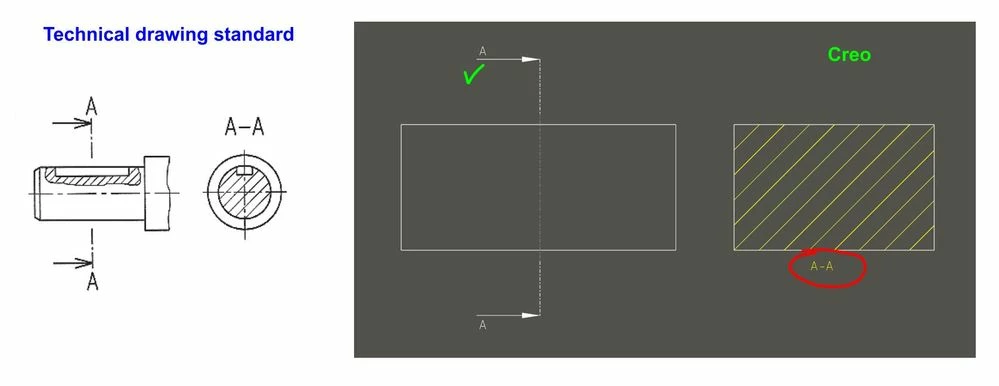
 

TDcross.jpg

I am missing something like these "drawing.dtl" options:


crossec_font_color (valid for arrows and xsec note)

crossec_font_height (valid for arrows and xsec note)

3 replies

10-Marble
November 25, 2024

Is your standard 1st angle projection or 3rd? If you’re after specific attributes you’ll need to update the environment.

There are many options for the arrow but your drawing would be similar in 1st or 3rd angle for the key, your standard appears to be 3rd angle.

PetrP14-AlexandriteAuthor
14-Alexandrite
November 25, 2024

What I want to achieve:

TDcrossOK.jpg

Ideally have an option to change height of the font as well for both (arrow+note) which is now in default size.

10-Marble
November 25, 2024

In the sections area of your drawing model name this section A

I do this but arrows are other side to what your require

upload_-aW1hZ2UwMDMuanBn-9163792548761877742..jpg

24-Ruby III
November 25, 2024

Hi,

you can use following detail options

def_view_text_height
def_view_text_thickness
I tested them in Creo 9.0. If you change their values in existing drawing existing views are not modified autimatically. New settings are applied to new views, only.

PetrP14-AlexandriteAuthor
14-Alexandrite
November 25, 2024

Option "def_view_text_height" works according to my needs.

No luck with "def_view_text_thickness" because applicable for some fonts only (for example TT fonts thickness is fixed by type of the font).


Would be nice to have "def_view_text_font" to switch for bold/italic etc. font version and also "def_view_text_color" to change font color.

24-Ruby III
November 25, 2024

@PetrP wrote:

Option "def_view_text_height" works according to my needs.

No luck with "def_view_text_thickness" because applicable for some fonts only (for example TT fonts thickness is fixed by type of the font).


Would be nice to have "def_view_text_font" to switch for bold/italic etc. font version and also "def_view_text_color" to change font color.


Hi,

you are right def_view_text_thickness option is applicable on proprietary Creo fonts, only.

6-Contributor
January 20, 2025

Hi PetrP, we have the same problem. Have you already found a solution?

PetrP14-AlexandriteAuthor
14-Alexandrite
January 20, 2025

Not sure if exists