
11-Garnet
October 25, 2020
Question

CSYS Orientation wrong rotation

  • October 25, 2020
  • 7 replies
  • 3598 views

Hi all, 

I've had this problem since creo 3 and can't figure it out. 

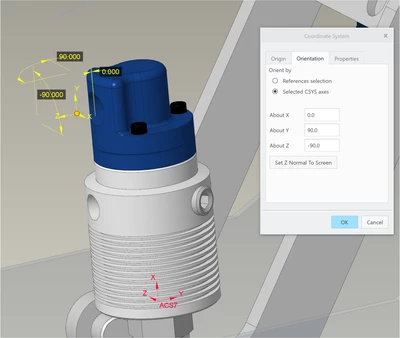
I've got one CSYS referenced off another CSYS, and I want to change the orientation of the child about one of its axes. In this case, it's a 90 degree elbow fitting and I want to rotate it so the hose part of the elbow is clocked but the threaded part stays in the tapped hole. 
Fianna_0-1603613218039.png


So I want to re-orient about Z of the child, or about Y of the parent, which are both in the same direction. 


If I change the X orientation, the child CSYS 'nods' about its own X axis, as expected. 
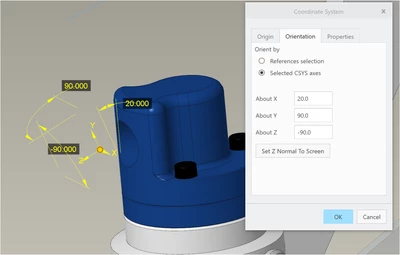
Fianna_1-1603613306025.png


Changing 'Y' orientation, the child CSYS shakes it's head left to right, again as expected. 
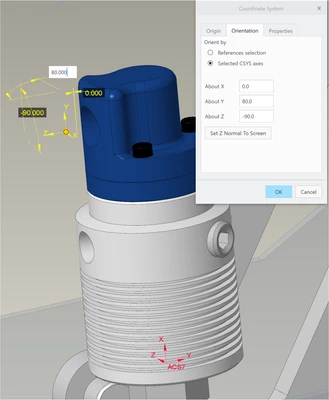
Fianna_2-1603613425507.png


However, I want to tilt it about it's own Z axis, -100 below, but when I do that, the CSYS 'nods' again the exact same direction as when I change the X rotation. This is not what I expected and doesn't match the orientation of the dimensions on the screen. 
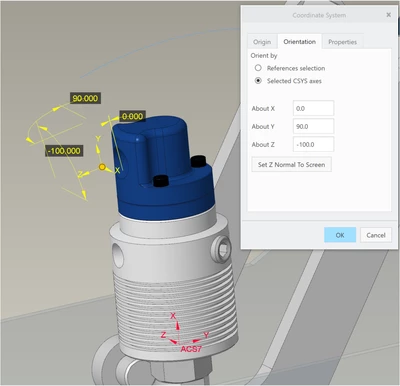
Fianna_3-1603613543645.png


Is this a bug that has been there forever or am I being stupid? 


7 replies

24-Ruby III
October 25, 2020

@Fianna wrote:

Hi all, 

I've had this problem since creo 3 and can't figure it out. 

I've got one CSYS referenced off another CSYS, and I want to change the orientation of the child about one of its axes. In this case, it's a 90 degree elbow fitting and I want to rotate it so the hose part of the elbow is clocked but the threaded part stays in the tapped hole. 

Fianna_0-1603613218039.png


So I want to re-orient about Z of the child, or about Y of the parent, which are both in the same direction. 


If I change the X orientation, the child CSYS 'nods' about its own X axis, as expected. 

Fianna_1-1603613306025.png


Changing 'Y' orientation, the child CSYS shakes it's head left to right, again as expected. 

Fianna_2-1603613425507.png


However, I want to tilt it about it's own Z axis, -100 below, but when I do that, the CSYS 'nods' again the exact same direction as when I change the X rotation. This is not what I expected and doesn't match the orientation of the dimensions on the screen. 

Fianna_3-1603613543645.png


Is this a bug that has been there forever or am I being stupid? 


Hi,

please upload your Creo files to enable their investigation.

24-Ruby III
October 26, 2020

INFO:

Rotation angles are related to axes of parent CSYS.

Fianna11-GarnetAuthor
11-Garnet
October 27, 2020

Hi Martin, 

I will create a test file later this morning & upload. 
I think the orientation is only related to the parent CSYS axis for some of the axes and not the others. 


I've had another example this morning; I'm trying to position this ring terminal onto the joint shown in Blue. 

Fianna_0-1603783087724.png

So, I need to rotate it about 30 degrees about the parent "Y" direction to match the angle of the contactor/bracket. But if I rotate about Y, the child CSYS rotates about its own Y: 

Fianna_1-1603783286098.png

Rotating about the "X" parent direction actually rotates the part about the parent "Y" direction, this rotates the part into the correct plane, but the yellow 30 degree dimension on the screen definitely isn't displaying in the same plane that the part is actually rotating

Fianna_2-1603783383151.png


Fianna11-GarnetAuthor
11-Garnet
October 27, 2020

Just looking closer at the screenshots now, I'm wondering if the re-orientation is happening about the child CSYS axes, but the yellow dimensions on the screen remain positioned on the parent X Y Z planes, even though the re-orientation is happening about the child directions? 

Fianna11-GarnetAuthor
11-Garnet
November 11, 2020

Thanks for the replies guys, I was afraid this might be the solution 😞 

At the moment we use a standard CSYS orientation for bolts, washers etc and if I do need to rotate a bracket or fitting or something I tend to do just as you suggested with an additional rotated CSYS and then re-reference or re-define the placement to suit.


I've had a play around with a sample assembly & I've got my head around the apply XYZ rotation in the x, y, z order but unfortunately it's not going to help speed up the visual re-orientation of stuff on screen, I'll have to stick to the above supplementary csys method or place using references and then switch back to a csys by the looks of it. 

Thanks for the help 🙂