1-Visitor
June 19, 2018
Solved

curve through points

  • June 19, 2018
  • 3 replies
  • 2988 views

Hi,


Can anyone please help me how to edit the curve which is drawn through points.


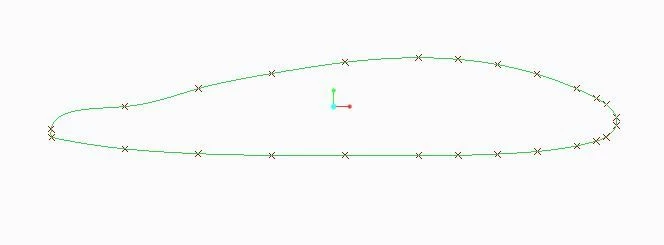
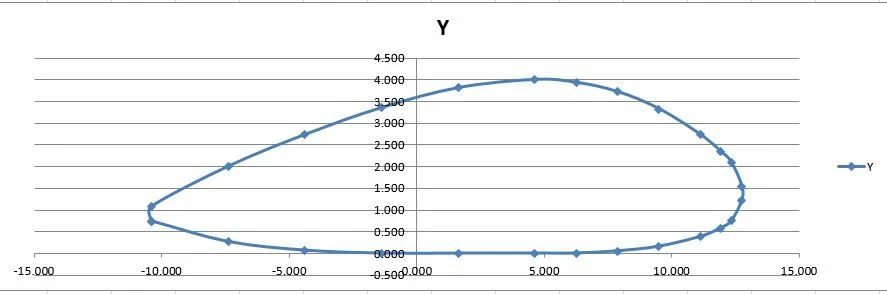
I have plotted the curve in Microsoft excel and creo but the curve from creo is different. can anyone please help me to solve my issue. I need a curve which is similar to the one drawn using excel(image-1).

I have attached the profile points excel sheet.

Thanks121.JPG
122.JPG

Best answer by MartinHanak

curve.pngHi,


  • remove line no.28 from Excel table (it is equal to line no.2)
  • create points offset from csys
  • create 1-st curve through points using points offset from csys
  • create 2-nd curve through points ... connect start and end point of 1-st curve + define tangency in end points

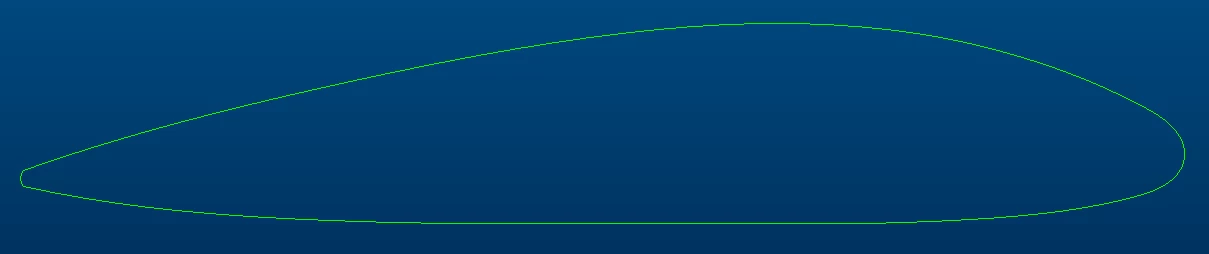
You will get this shape:


3 replies

1-Visitor
June 20, 2018

 Hi naveen,

Your excel curve has not the same scale on X & Y, that is why the curve shown in Creo is different (but much true).


24-Ruby III
June 20, 2018

curve.pngHi,


  • remove line no.28 from Excel table (it is equal to line no.2)
  • create points offset from csys
  • create 1-st curve through points using points offset from csys
  • create 2-nd curve through points ... connect start and end point of 1-st curve + define tangency in end points

You will get this shape:


1-Visitor
June 20, 2018

Hi Martin,

Thanks a lot for helping me solve my problemSmiley Very Happy


@MartinHanak wrote:

curve.pngHi,


  • remove line no.28 from Excel table (it is equal to line no.2)
  • create points offset from csys
  • create 1-st curve through points using points offset from csys
  • create 2-nd curve through points ... connect start and end point of 1-st curve + define tangency in end points

You will get this shape: