
14-Alexandrite
August 5, 2020
Question

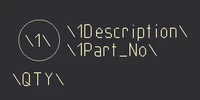
Custom BOM Balloon with Manual Override

  • August 5, 2020
  • 1 reply
  • 9181 views

Hello,

In Creo 5, I am creating a custom BOM balloon.  In the custom symbol, I have added a note below the balloon to allocate space for entering quantity manually as shown.  After placing the BOM balloon, shouldn't there be a way to change the value for 'QTY'?  Double-clicking the balloon, there is no option to do so it seems.  Thanks.
wbottis_0-1596631190193.png


1 reply

StephenW
23-Emerald III
August 5, 2020

Is this a "driven" balloon for a repeat region BOM or is it just a symbol that is completely manually driven?

On a repeat region balloon, I don't think there is a way to add modifiable text for each balloon.

For a manual symbol, when you create it, it looks like you have it correct with the slashes.In the symbol creation , when you select the text and then attributes, select variable text to see the variable stuff.

StephenWilliams_0-1596632852548.png


wbottis14-AlexandriteAuthor
14-Alexandrite
August 5, 2020

This is a driven balloon for a repeat region.  The Attributes dialogue box has a radio button 'Preset values only'.  What does this do?

StephenW
23-Emerald III
August 5, 2020

Preset values is when there is a limited number of "values" a user can set an item to, maybe A, B, C, D only, no other values allowed.

I have never seen a repeat region balloon with modifiable values. If you really need modifiable values, you may want to look in to component parameters that you will be able to use within your BOM table/ BOM Balloons