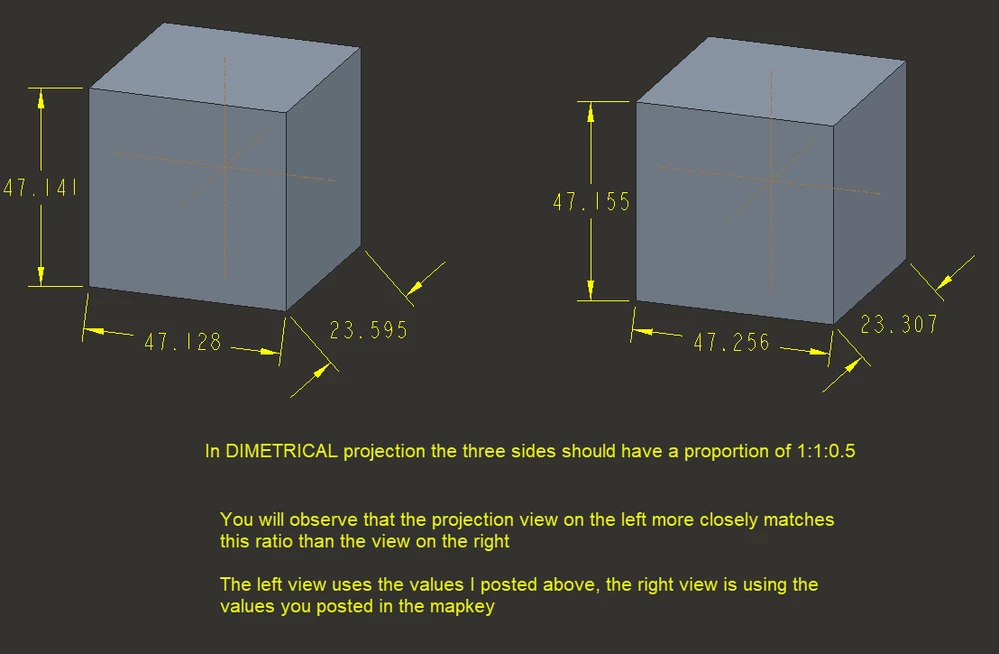
Custom projection view in Creo
Hello everyone!
I want to share the information how to create custom projection views for diferent scenarios.
It took me some time to get this done.
If you want to create ISO, Dimetric or custom projection views you can do it by using these formulas:
a= atan(sqrt(tan(α)*tan(β))/(tan(β))) - angle of rotation on vertical axis
b= asin(sqrt(tan(α)*tan(β))) - angle of rotation on horizontal axis
α and β - are the angles you want for projection view (ex. Dimetric view α = 7, β = 42)
a and b are the input angles for rotation of the part, as a result you get α and β for the projection view.
The best thing is to add a mapkey to do it for you:
I've added this to my config file:
!Dimetric view
mapkey ww1 @MAPKEY_NAMECreate a dimetric view;@MAPKEY_LABELDimetric view 1 (ww1);\
mapkey(continued) `igToolbar_AncestorIGT_IGT_GRP_inh396938342.proe_win:casc340798662`;\
mapkey(continued) ~ Command `ProCmdViewOrient` ;\
mapkey(continued) ~ Select `orient` `SetupOptions` 1 `dynorient`;\
mapkey(continued) ~ Update `orient` `spinPH.YSpinBox` -20.268067;\
mapkey(continued) ~ Activate `orient` `spinPH.YSpinBox` -20.268067;\
mapkey(continued) ~ Update `orient` `spinPH.XSpinBox` 19.420537;\
mapkey(continued) ~ Activate `orient` `spinPH.XSpinBox` 19.420537;\
mapkey(continued) ~ Activate `orient` `panzoomPH.ZoomFitPB`;\
mapkey(continued) ~ Input `orient` `NameVw_IP` `08_dimetric_1`;\
mapkey(continued) ~ Update `orient` `NameVw_IP` `08_dimetric_1`;\
mapkey(continued) ~ Activate `orient` `NameVw_PB_Save`;~ Activate `orient` `OkPB`;
ww1 - is the shortcut to trigger the mapkey.
I hope this helps.