
11-Garnet
May 28, 2025
Question

Custom Serial Numbering in Creo Repeat Region Tables (e.g., 1_1, 1_2,2,3, 4_1.4_2,4_3, 5.6.7....)
  • May 28, 2025
  • 1 reply
  • 971 views

SKY_1-1748444910684.png


Hello,


I want to customize the serial numbers shown in a repeat region table in Creo drawings. Instead of using the default linear numbering (1, 2, 3, ...), I’d like to apply a more structured format like;


1_1
1_2
2
3
4_1
4_2
4_3
5
6
7

This is especially useful when I need to group sub-items under a main item, or indicate logical associations between parts in an assembly.

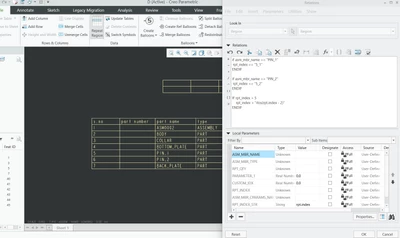
I've tried using rpt.index and creating relations in the repeat region, but I’m not sure how to dynamically generate such custom values. 


What’s the best way to set this up in Creo so that the table updates automatically based on the model?

1 reply

24-Ruby III
May 29, 2025

Hi,


1.]
You cannot modify a value of system rpt_index parameter.

2.]
Replace rpt_index with my_rpt_index on the left side of relations.

3.]
In table cell replace &rpt_index with &rpt.rel.my_rpt_index

SKY11-GarnetAuthor
11-Garnet
May 29, 2025

Hi Martin Hanák ,

Thank you for the clarification!

  1. Understood that rpt_index is a system parameter and cannot be modified directly.

  2. I’ve replaced rpt_index with my_rpt_index on the left-hand side of the relations as suggested.

  3. Also updated the table cell to use &rpt.rel.my_rpt_index.

That worked perfectly for the custom values like 5_1 and 5_2.

Could you please also guide me on how to show the remaining serial numbers (like 1, 2, 3, 4, 6, 7) in sequence, while skipping/adjusting around the modified custom ones?

Thanks again for your support!

SKY_0-1748500088643.png


24-Ruby III
May 29, 2025

@SKY wrote:

Hi Martin Hanák ,

Thank you for the clarification!

  1. Understood that rpt_index is a system parameter and cannot be modified directly.

  2. I’ve replaced rpt_index with my_rpt_index on the left-hand side of the relations as suggested.

  3. Also updated the table cell to use &rpt.rel.my_rpt_index.

That worked perfectly for the custom values like 5_1 and 5_2.

Could you please also guide me on how to show the remaining serial numbers (like 1, 2, 3, 4, 6, 7) in sequence, while skipping/adjusting around the modified custom ones?

Thanks again for your support!

SKY_0-1748500088643.png


Hi,

rpt_index = "my_rpt_index" ... this is nonsense


Try following relation instead of it ...

my_rpt_index = rpt_index