1-Visitor
December 28, 2021
Solved

Cutout in assembly does not update correctly in family table members

  • December 28, 2021
  • 3 replies
  • 10849 views

I am using Creo Parametric - Release 4.0 (connected) 4.0 M140

I have an assembly with two parts (X & Y) part X is used in a family table. Part Y is assembled to X using datum planes in part X that are set to rotate 180° in part X's family table members. The planes and model Y rotate 180° correctly in the assembly but the cutout created in the assembly of X & Y is not rotated in the family member (changes to part Y appear in the cutout but the defined rotation does not happen). This worked very well in previous versions and works in 4.0 IF the cutout was created in an older version. If the cutout is recreated in 4.0 it does not work.


Added zip file with model example of 4.0 behavior.

 

Best answer by tbraxton

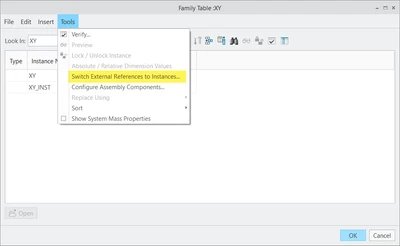
I have found the resolution to this issue. There is an option within the family table UI to switch external refs to instances. This results in the merge/cut out updating based on the assembly instance as desired.


tbraxton_0-1640741663712.png


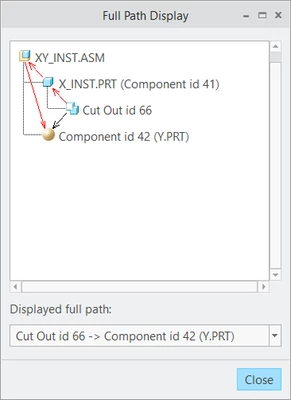
This results in the following reference graph from the GRV where the cutout is now driven by the assembly instance as desired.


tbraxton_1-1640741735506.png

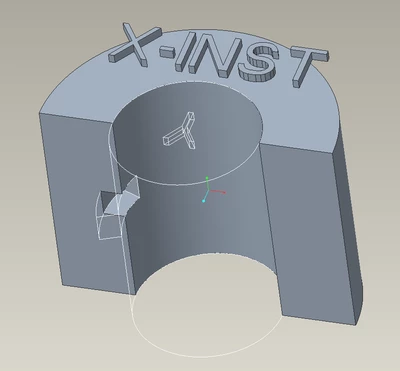
The cutout in the assembly instance.

tbraxton_2-1640741799349.png


3 replies

tbraxton
22-Sapphire II
22-Sapphire II
December 28, 2021

Have not figured out the root cause yet but there are some indications that the models are not reflecting your design intent. I have not seen any circular reference warnings or .crc files being written which is good.


But...


Creo 4 M150.


Warning message presented at the command line:

•Warning: Part X_INST has reference to generic assembly XY.

This message suggests that the reference to the generic instance of the assembly is why the cut out is not rotating. It appears that the cut out is regenerating using the position of component Y in the generic instance of XY.asm. This is consistent with the state of the models when regenerated but not your design intent. It should reference instance XY_INST.asm to locate the coutout accurately.


Glyph in model tree indicating something, It is similar to failed regen but not an exact match. This is the part with the merge/cutout so it is suspicious. Does anyone know what this X superscript glyph indicates?


tbraxton_0-1640729910449.png


MT_WashPA1-VisitorAuthor
1-Visitor
December 28, 2021
Hi, tbraxton. Thanks for taking the time to look at this. Unfortunately
you are misunderstanding the issue. Hopefully the following helps.
Normal direction of PL plane is the same in all instances. Dtm1 and Dtm2
are the controlling planes of part Y. They rotate 180° in the XINST part
causing the Y part to rotate (this is desired) however the cutout does not
rotate as it should.
tbraxton
22-Sapphire II
22-Sapphire II
December 29, 2021

This is the reference viewer graph (Creo 4 M150) of the merge/cut out feature in the XY_INST.asm. As you can see Creo is showing that the cutout is driven by the generic XY.asm hence the position is not updating. The cutout would have to be driven by the assembly xy instance that has the rotated part Y.prt. The models reflect what is documented by this graph. Can you check the reference graph in Creo 4 of a model set that was created in an earlier version (3-) and compare it to see of the references are different than shown here?


tbraxton_0-1640738124915.png


tbraxton
22-Sapphire II
tbraxton22-Sapphire IIAnswer
22-Sapphire II
December 29, 2021

I have found the resolution to this issue. There is an option within the family table UI to switch external refs to instances. This results in the merge/cut out updating based on the assembly instance as desired.


tbraxton_0-1640741663712.png


This results in the following reference graph from the GRV where the cutout is now driven by the assembly instance as desired.


tbraxton_1-1640741735506.png

The cutout in the assembly instance.

tbraxton_2-1640741799349.png


MT_WashPA1-VisitorAuthor
1-Visitor
December 29, 2021

Thank you tbraxton!!!

I have several "master" models, assemblies and drawings that were initially built with ProE 11 (year 1994)?? or there abouts and have been utilized, updated, modified thru most of the iterations since then including Wildfire 1, 2, 3, 4 and Creo 1, 2, 3 and now working in 4.  Many of the features have been recreated in one or more of the newer versions without issue.  This is one of the few times things to not work nearly as well (as expected to work).  This method of cutting out a part using another is a feature that is always present in these "masters" but recently increased complexity of the part used to make the cut has caused the cutout to fail.  Remaking the cut in the current version (Creo 4) seems to solve the failure but lead to this failure to rotate the cutout in the instances.  Again, thank you so much for the assist!!!