7-Bedrock
October 8, 2019
Solved

Datum Curve Through Points Fails

  • October 8, 2019
  • 1 reply
  • 2528 views

In trying to create a datum curve through a points table with 88 points, it fails if I select the points group from the browser.  However, if I select each point in order individually, it works.  Any Thoughts?


Copy of the file is included

Best answer by TomU

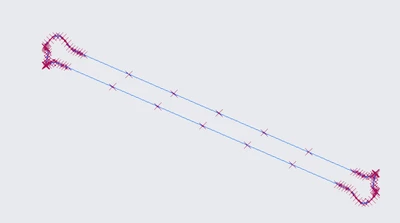
You have three sets of duplicate points in the middle of your data.  (A duplicate point at the start and end is fine.)


clipboard_image_0.png


clipboard_image_1.png


clipboard_image_2.png


Once you remove one of each of these the curve works fine.


clipboard_image_3.png

1 reply

TomU23-Emerald IVAnswer
23-Emerald IV
October 8, 2019

You have three sets of duplicate points in the middle of your data.  (A duplicate point at the start and end is fine.)


clipboard_image_0.png


clipboard_image_1.png


clipboard_image_2.png


Once you remove one of each of these the curve works fine.


clipboard_image_3.png

Henry_H7-BedrockAuthor
7-Bedrock
October 9, 2019

That was it.  But now a follow-up question.  I will have a model with a number of these point tables and curves.  There will be situations where i need to use a new point table which is very similar, but one that does have slightly different point locations.  Is there a way to replace the points in the table without a lot of button pushing?  I will have a number of them, and it takes a while.  And I will be doing work that references the table and curve so I would rather have the points table update, rather than creating a new table.  Is this something that can be scripted (not necessarily a map key)?

23-Emerald IV
October 9, 2019

It's really easy to delete the existing points while you're editing the point feature.  Simply select the first item in the list, hold down SHIFT, select the last item in the list, right click, and select 'Delete'.  At this point (no pun intended) you can simply re-import your updated points lists (just like you one your provided to this thread.)  You may find it easier to rename it *.pts.  Also adding or removing points from the point feature should not cause the subsequent curve from points feature to fail as long as it can form a continuous connection (with no duplicates in the middle.)


As far as automation, I use SmartAssembly here to do something similar.  In my case I'm reading in 14,400 point coordinates from an Excel file, adding these to points arrays, and then updating the points features in the Creo models with the new data.  Very simply to do, but requires owning this software.  If I didn't have that available I'd probably try making a mapkey that would delete all the points in a feature and then prompt me to select the new points file for importing.