14-Alexandrite
March 11, 2026
Solved

Datum Reference Frame Annotation (Y14.41)

  • March 11, 2026
  • 1 reply
  • 197 views

Is it possible to add a Datum Reference Frame CSY to an annotation state?  If its not supported now, what work-arounds are people currently using?


To my understanding, the DRF must be displayed in the model IAW Y14.41 (2018) Section 11.2.1.    DRF's were optional in Y14.5, but are required in Y41.41.


I haven't been successful with "Reference" feature on the Model Tab, or the "Establish DRF" in GDT Advisor.


 Example Image from Creo 12
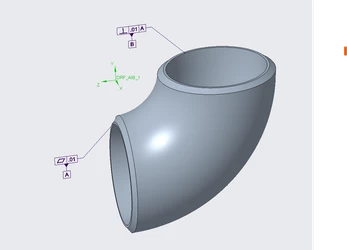
DRF_Example.png

Excerpt from Y14.41 for example display of DRF's.
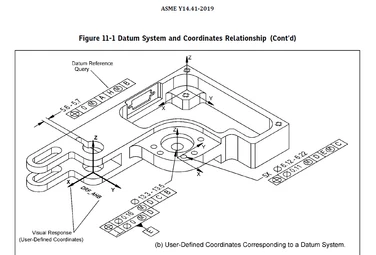
Y14.41_Example.png


Best answer by Mfridman

Hi @N.Barnes 


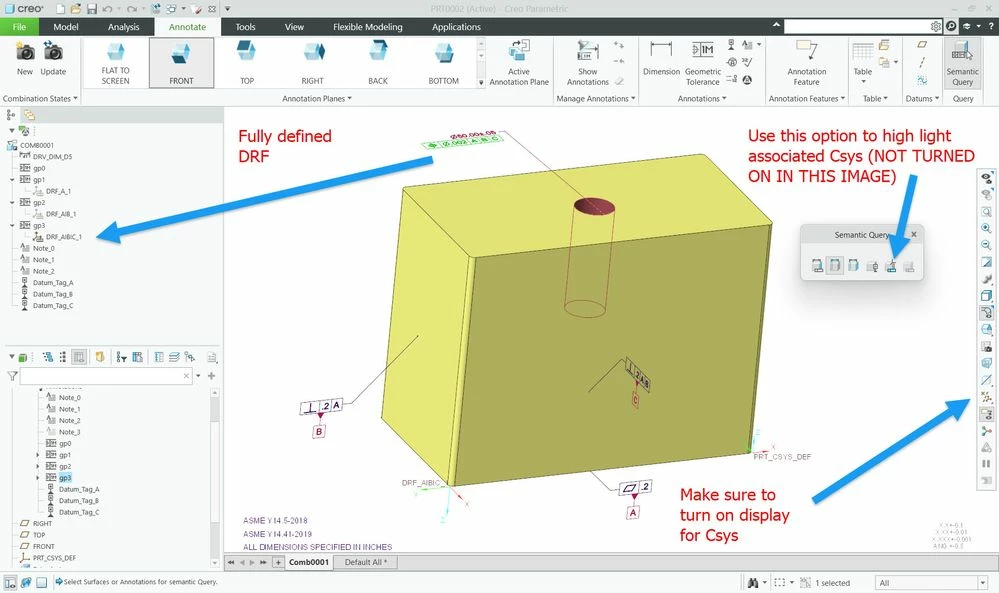
You can definitely display DRF Csys in combination states. please note that you first would need to fully define the DRF under the gtol in the tree and then it can displayed. You can also highlight it with a special mode when you query associated annotations (even if it was hidden from the state) or have it shown without the need to query in order to see it.


Csys.jpg


Best Regards,

Michael Fridman

Creo Product Manager

1 reply

Mfridman16-PearlAnswer
16-Pearl
March 12, 2026

Hi @N.Barnes 


You can definitely display DRF Csys in combination states. please note that you first would need to fully define the DRF under the gtol in the tree and then it can displayed. You can also highlight it with a special mode when you query associated annotations (even if it was hidden from the state) or have it shown without the need to query in order to see it.


Csys.jpg


Best Regards,

Michael Fridman

Creo Product Manager

N.Barnes14-AlexandriteAuthor
14-Alexandrite
March 12, 2026

That is helpful, but they are so strange compared to the other annotations.  Here are a few concerns.  (Creo 10.0.8.0 (video) and Creo 12.4.2.0)

1) Can't "Add to the Annotations State", instead you have to know to assign the CSY to make it show up.  (Then assigning CSY behavior is weird, 2 & 3 below).

Seems like it should use the "Add to State" method, then prompt for CSY if one isn't defined already.

2) How are the Reference CSY used?

2A) Can't inspect the DFS for what CSY its referencing.  "Define Coordinate System" is blank each time

2B) The offset is ignored

2C) The selected CSY orientation is ignored

2D) DFS allows a miss-aligned CSY to be selected.

2E) When the DFS is shown on another view state, the "new" CSY that is selected is ignored (or maybe one is never registered?)

3) I can create a DFS without associating to a "Corresponding Coordinate system" (see Y14.41 (2018), Sec. 11.2.1(a))

4) DFS doesn't reappear after CSY display is toggled. (regular CSY behave normally)

5) Opinion, In an annotated Annotation State, I think the display of the DFS should be persistent, and not depend on the view CSY visibility (Same thought for axis display as well.  View visibility should only control csys and axes not "added to state")

(view in My Videos)


16-Pearl
March 15, 2026

Thank you for providing this valuable input @N.Barnes 


I think that the best way forward would be if you could create a tech support case and report all these observations.

This way, a customer SPR will be created for your tracking, as well as R&D will be able to investigate and provide fixes where possible.


Thanks,

Michael