10-Marble
February 4, 2021
Solved

Datum's such as planes or coordinate systems not showing.

  • February 4, 2021
  • 1 reply
  • 3067 views

I'm having an issue with my datum filter not showing anything such as planes or coordinate systems and points. I have them checked and have show annotations but that gives me an error of "No annotations can be shown for the selected objects.". I'm using Creo 4.


Any help would be appreciated.

Best answer by kdirth

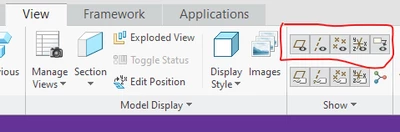
On the view tab, check that the datum are set to show.

kdirth_0-1612449702229.png

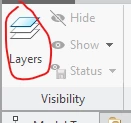
Also in the view tab, select the Layers button to view the layer tree.

kdirth_1-1612449826233.png

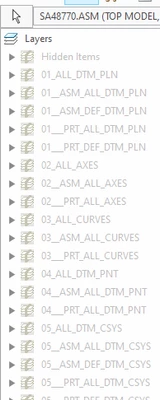
Unhide the appropriate, or all, layers.

kdirth_2-1612449893944.png


1 reply

kdirth
21-Topaz I
kdirth21-Topaz IAnswer
21-Topaz I
February 4, 2021

On the view tab, check that the datum are set to show.

kdirth_0-1612449702229.png

Also in the view tab, select the Layers button to view the layer tree.

kdirth_1-1612449826233.png

Unhide the appropriate, or all, layers.

kdirth_2-1612449893944.png


There is always more to learn.
10-Marble
February 4, 2021

I would have never of looked there, thank you!!